Steam Builder Uploader
Fork
Editor tool that streamlines uploading builds to steam. Has built-in unity cloud support too
com.veugeljame.steambuilduploader Install via UPM
Add to Unity Package Manager using this URL
https://www.pkglnk.dev/steambuilduploader.git 
README Markdown
Copy this to your project's README.md

## Installation
Add **Steam Builder Uploader** to your Unity project via Package Manager:
1. Open **Window > Package Manager**
2. Click **+** > **Add package from git URL**
3. Enter:
```
https://www.pkglnk.dev/steambuilduploader.git
```
[](https://www.pkglnk.dev/pkg/steambuilduploader)Dependencies (2)
README
Steam Build Uploader
This package is designed to help automate the process of uploading builds to Steam. It is designed to work with the Unity Cloud Build system and the Steam SDK.
Setup
- Add the package to your project in package manager using giturl
https://github.com/JamesVeug/UnitySteamBuildUploader.git - Add the
editorcoroutinepackage to your project - Add the
newtonsoft packageto your project https://github.com/applejag/Newtonsoft.Json-for-Unity/wiki/Install-official-via-UPM - Go to the SteamSDK tab and setup your game
SteamSDK Tab
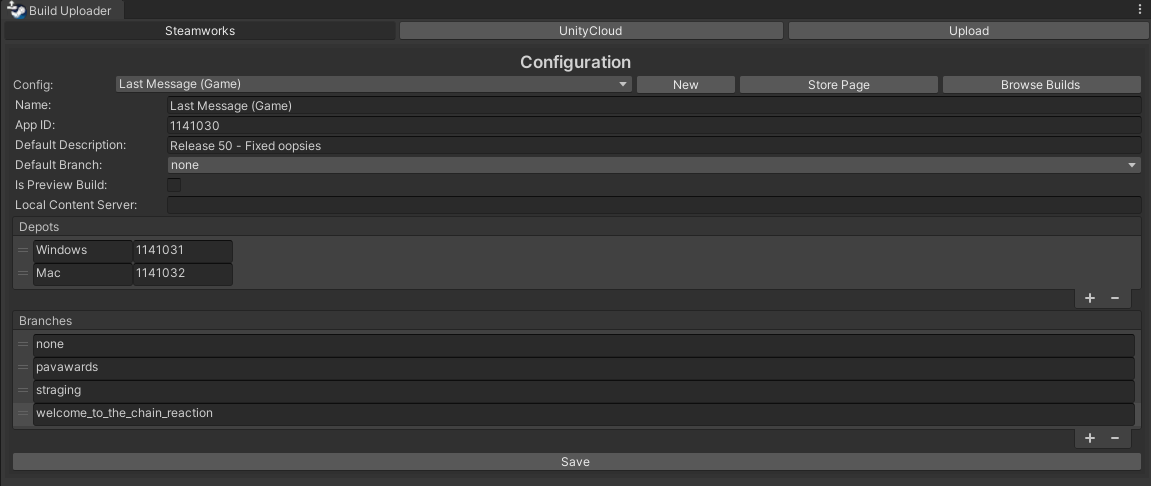
Utilize the SteamSDK to connect to steam. Setup your individual games with the repos and branches you want to upload to.
Download and extract the SteamSDK to a folder on your computer: https://partner.steamgames.com/doc/sdk
Unity Cloud Tab

Utilize Unity Cloud to automate make builds of your project.
- Tracks progress of current builds
- Start a new build
- Download builds
Sync Tab

Specify where you want builds to come from adn where you want them to go.
- You can specify a file on your computer or choose from your UnityCloud builds.
- Choose where you want the build to go (Steam depot & branch)
- Set a description to appear on steam
- Click Downlaod and Upload all
NOTE: You can not upload to the none branch (default branch everyone uses). This is on purpose to avoid uploading the wrong build. Also the SKD does not allow this.
Comments
No comments yet. Be the first!
Sign in to join the conversation
Sign In