SRP Color Blindness

SRP Color Blindness is a post-processing effect for Universal Render Pipeline that simulates various types of color vision deficiency. Supporting eight major blindness types including Protanopia, Deuteranopia, Tritanopia, and Achromatopsia, it enables developers to implement accessibility features that help colorblind players experience games as intended. Simple two-step integration through URP renderer features and volume overrides.
com.am1goo.unity.srp.colorblindness Install via UPM
Add to Unity Package Manager using this URL
https://www.pkglnk.dev/colorblindness.git 
README Markdown
Copy this to your project's README.md

## Installation
Add **SRP Color Blindness** to your Unity project via Package Manager:
1. Open **Window > Package Manager**
2. Click **+** > **Add package from git URL**
3. Enter:
```
https://www.pkglnk.dev/colorblindness.git
```
[](https://www.pkglnk.dev/pkg/colorblindness)Dependencies (1)
README
Unity SRP 'Color Blindness' Post Effect
Simple package to bring color blindness support into your game.
Features
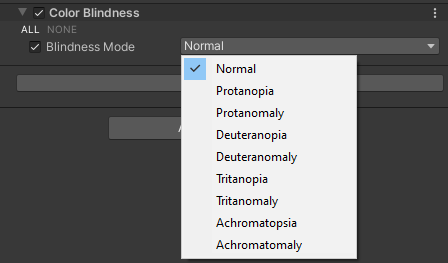
Support of all major types of blindness:
- Protanopia
- Protanomaly
- Deuteranopia
- Deuteranomaly
- Tritanopia
- Tritanomaly
- Achromatopsia
- Achromatomaly
How to install?
Unity Plugin
via Unity Package Manager
The latest version can be installed via package manager using following git URL:
https://github.com/am1goo/unity-srp-colorblindness.git#1.0.4
How to use?
You can easily add support of this effect to every your URP projects in two simple steps:
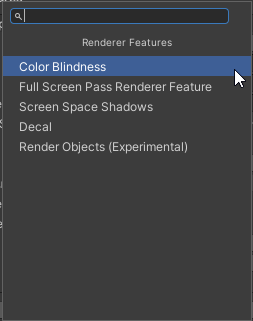
1) Add renderer feature to your URP Renderer
Your Renderer Data -> Add Renderer Feature -> Color Blindness

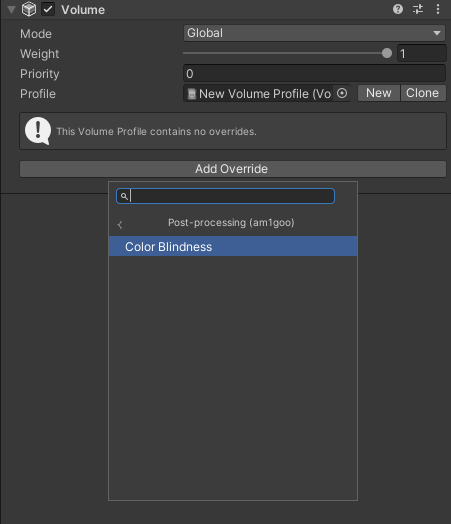
2) Add renderer override to your URP Volume
Your Volume Profile -> Add Override -> Post-processing (am1goo) -> Color Blindness
That's it!
Limitations
- UI with Screen Space - Overlay is not supported.
Requirements
- Universal Render Pipeline 14.0.2
- 'Native RenderPass' should be enabled
- 'Anti Aliasing (MSAA)' should be enabled (in pipeline asset and in camera settings)
Tested in
- Unity 2022.3.x
Contribute
Contribution in any form is very welcome. Bugs, feature requests or feedback can be reported in form of Issues.
Comments
No comments yet. Be the first!
Sign in to join the conversation
Sign In