License manager

License Manager automatically discovers and catalogs all LICENSE files in your Unity project, generating comprehensive reports on third-party assets and their licensing terms. Create a LicenseCollector asset, refresh to scan Assets and Packages folders, then access runtime reports flagging non-commercial restrictions and viral licenses that may impact your project distribution.
com.am1goo.licensemanager Install via UPM
Add to Unity Package Manager using this URL
https://www.pkglnk.dev/licensemanager.git 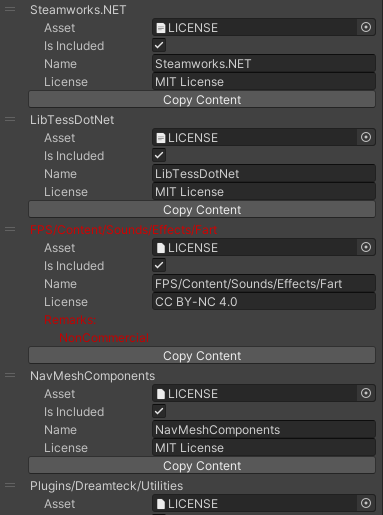
README Markdown
Copy this to your project's README.md

## Installation
Add **License manager** to your Unity project via Package Manager:
1. Open **Window > Package Manager**
2. Click **+** > **Add package from git URL**
3. Enter:
```
https://www.pkglnk.dev/licensemanager.git
```
[](https://www.pkglnk.dev/pkg/licensemanager)Dependencies (1)
README
License Manager for Unity
A simple tool to find all LICENSE files in Unity project and get a report on all these files.
This is might be very helpful if you need to reveal info about all third-party assets used in your project.
Works with Assets and Packages folders.
How to use?
- Create
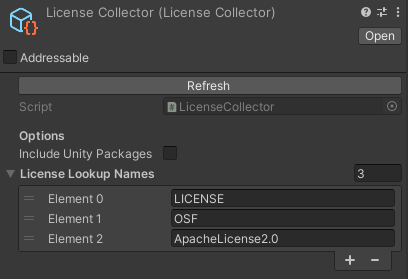
LicenseCollectorasset viaCreate -> License Manager -> Collectorcontext menu somethere in project - Press button Refresh
- To get runtime report use this code:
[SerializeField]
private LicenseManager.LicenseCollector _collector;

void Start()
{
    var report = _collector.GetReport();
    foreach (var entry in report)
    {
        //do something here with each entry
        string name = entry.name;
        string content = entry.content;
        string license = entry.license;
        LicenseManager.LicenseRemarks remarks = entry.remarks;

        if (remarks.HasFlag(LicenseManager.LicenseRemarks.NonCommercial))
        {
            Debug.LogWarning($"{name} asset could be used but only in non-commercial projects, because it has {license}");
        }
        if (remarks.HasFlag(LicenseManager.LicenseRemarks.Viral))
        {
            Debug.LogError($"{name} asset has viral {license} and probably cannot be placed in this project");
        }
    }
}
Unity Plugin
The latest version can be installed via package manager using following git URL:
https://github.com/am1goo/unity-plugin-license-manager.git#0.0.10
Screenshots
LicenseCollectorsettings
- Visual report of all collected licenses in project
What next?
- Build post-process callback (to get correct report up-to-date)
- More supported licenses (except the most popular ones)
Tested in
- Unity 2020.3.x
- Unity 2022.3.x
Contribute
Contribution in any form is very welcome. Bugs, feature requests or feedback can be reported in form of Issues.
Comments
No comments yet. Be the first!
Sign in to join the conversation
Sign In