UI Toolkit Plus
- Boilerplate Code Generation - Tabs - Reorderable Manipulator - Built-in USS Exporter
com.quickeye.ui-toolkit-plus 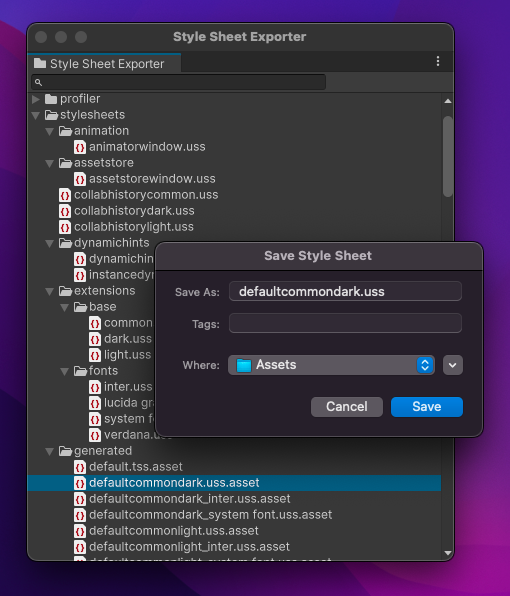
Install via UPM
Add to Unity Package Manager using this URL
https://www.pkglnk.dev/ui-toolkit-plus.git README Markdown
Copy this to your project's README.md
Style
Preview 
## Installation
Add **UI Toolkit Plus** to your Unity project via Package Manager:
1. Open **Window > Package Manager**
2. Click **+** > **Add package from git URL**
3. Enter:
```
https://www.pkglnk.dev/ui-toolkit-plus.git
```
[](https://www.pkglnk.dev/pkg/ui-toolkit-plus)README
UI Toolkit Plus




About
Reusable features for UI Toolkit runtime and editor.
UI Code Generation
You can generate a partial C# class from the UXML file.
Given the following UXML:
<ui:VisualElement>
    <ui:Label name="title" />
</ui:VisualElement>
<ui:VisualElement name="menu">
    <ui:Button name="confirm-button" />
</ui:VisualElement>
Tool generates C# script:
partial class UXMLFileName
{
    private Label title;
    private VisualElement menu;
    private Button confirmButton;

    private void AssignQueryResults(VisualElement root)
    {
        title = root.Q<Label>("title");
        menu = root.Q<VisualElement>("menu");
        confirmButton = root.Q<Button>("confirm-button");
    }
}
Style Sheet Exporter
Open from context menu: Window/UI Toolkit/Style Sheet Exporter
Available with Unity 2022.1 and newer
Ever wanted to see how Unity's built-in controls are styled?
With this tool, you can! Export style sheet assets used by Unity Editor to USS files.
TabGroup, Tab and TabDropdown
Sample project: Samples/Tabs

ReorderableManipulator
Sample project: Samples/ReorderableCards

No comments yet. Be the first!