Prefab Pool
Configurable prefab instance pooling system that reduces instantiation overhead. Supports multiple deployment options (project assets, scene components, or embedded in scripts), prewarming, generic typing, pooled object callbacks, Addressables integration, and Inspector debugging for monitoring active and inactive instances.
com.gilzoide.prefab-pool 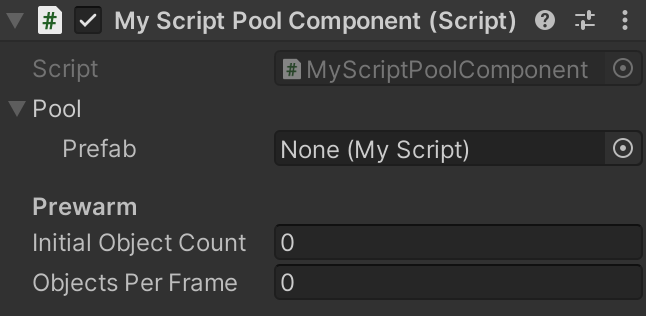
Install via UPM
Add to Unity Package Manager using this URL
https://www.pkglnk.dev/prefab-pool.git README Markdown
Copy this to your project's README.md

## Installation
Add **Prefab Pool** to your Unity project via Package Manager:
1. Open **Window > Package Manager**
2. Click **+** > **Add package from git URL**
3. Enter:
```
https://www.pkglnk.dev/prefab-pool.git
```
[](https://www.pkglnk.dev/pkg/prefab-pool)README
Prefab Pool

Prefab instance pool that is configurable in the Inspector, supports any engine Object type and is available as a serializable C# class, MonoBehaviour and ScriptableObject.
Features
- Prefab pools may live either as project assets (PrefabPoolAsset), standalone components in the scene (PrefabPoolComponent), or may be a part of your own scripts (PrefabPool), whichever fits best your use case.
- Supports prewarming instances: configure pools to instantiate a number of prefabs when created, with an optional limit of objects per frame to avoid spikes in CPU usage.
- Supports generic typing for customizing which prefabs can be assigned to the pool.
By default, the
GameObjecttype is used in the non-generic prefab pool classes. - Optionally add scripts that implement IPooledObject to the prefab for receiving callbacks when object is taken from/returned to pool.
With this, you can also easily return the prefab to the pool by calling the
IPooledObject.ReturnToPool()extension method. - Debug panel in inspector that shows all active and inactive pooled instances.
- Addressables support: just use the
AddressablePrefabPool*variants instead of thePrefabPool*ones and setup the prefab's asset reference in the Inspector. Addressables are automatically loaded when the first instance is created and released when the pool is disposed of.
How to install
Either:
- Use the openupm registry and install this package using the openupm-cli:
openupm add com.gilzoide.prefab-pool - Install using the Unity Package Manager with the following URL:
https://github.com/gilzoide/unity-prefab-pool.git#1.0.0 - Clone this repository or download a snapshot of it directly inside your project's
AssetsorPackagesfolder.
Usage example
using System.Collections;
using Gilzoide.PrefabPool;
using UnityEngine;

public class MyScript : MonoBehaviour
{
    // 1) Reference a prefab pool:

    // 1.a) Reference for a PrefabPoolComponent from your scene.
    //      Set this in the Inspector.
    public PrefabPoolComponent myPoolComponent;

    // 1.b) Reference for a PrefabPoolAsset from your project.
    //      Set this in the Inspector.
    public PrefabPoolAsset myPoolAsset;

    // 1.c) Private/embedded PrefabPool, needs manual prewarm/disposal.
    //      Configure it in the Inspector.
    public PrefabPool myPoolVariable;


    void Start()
    {
        // 2) (optional) Prewarm private/embedded pools.
        //    Passing "instancesPerFrame: N" makes instances be
        //    created frame by frame, avoiding CPU spikes.
        myPoolVariable.Prewarm(10, instancesPerFrame: 1);
        //    Component/asset pools prewarm automatically in their `OnEnable`.

        for (int i = 0; i < 10; i++)
        {
            StartCoroutine(UseInstanceFromPool(myPoolComponent));
            StartCoroutine(UseInstanceFromPool(myPoolAsset));
            StartCoroutine(UseInstanceFromPool(myPoolVariable));
        }
    }

    // 3) Use the pool:
    //    (All prefab pool types implement IPrefabPool<>)
    public IEnumerator UseInstanceFromPool(IPrefabPool<GameObject> pool)
    {
        // 3.1) Get an instance.
        GameObject instance = pool.Get();

        // 3.2) Do something with your instance.
        yield return new WaitForSeconds(1);

        // 3.3) Return instance to pool after done with it.
        pool.Release(instance);
    }

    // 4) Dispose of private/embedded pools.
    //    Embedded pools should always be disposed when not needed anymore!
    //    Component/asset pools dispose automatically in their `OnDisable`.
    void OnDestroy()
    {
        myPoolVariable.Dispose();
    }
}
Using generic prefab pools
Specifying the prefab type for PrefabPool<>
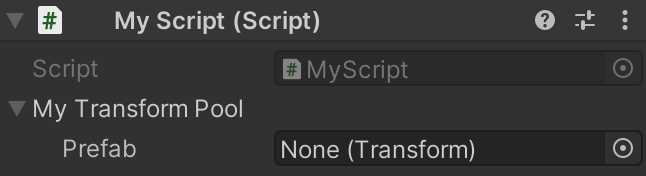
To customize the prefab type accepted by a prefab pool, just declare your variable with a concrete version of the PrefabPool<> class.
using Gilzoide.PrefabPool;
using UnityEngine;

public class MyScript : MonoBehaviour
{
    public PrefabPool<Transform> myTransformPool;

    void OnDestroy()
    {
        myTransformPool.Dispose();
    }
}
Specifying the prefab type for PrefabPoolComponent<>
To customize the prefab type accepted by a prefab pool component, create a concrete class that inherits PrefabPoolComponent<>:
using Gilzoide.PrefabPool;

public class MyScriptPoolComponent : PrefabPoolComponent<MyScript>
{
}
Specifying the prefab type for PrefabPoolAsset<>
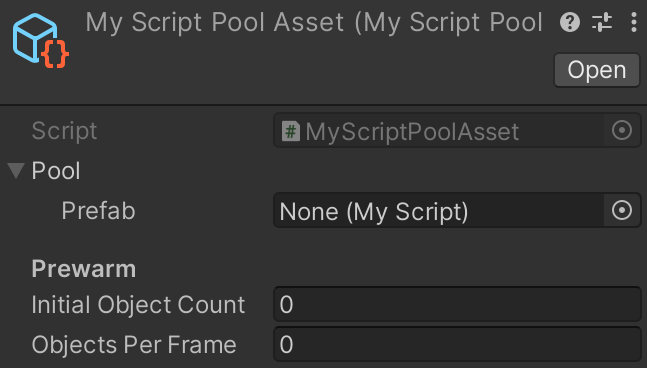
To customize the prefab type accepted by a prefab pool asset, create a concrete class that inherits PrefabPoolAsset<>:
using Gilzoide.PrefabPool;
using UnityEngine;

[CreateAssetMenu(menuName = "MyScriptPoolAsset")]
public class MyScriptPoolAsset : PrefabPoolAsset<MyScript>
{
}
Similar projects
- https://github.com/BeauPrime/BeauPools
- https://github.com/coimbrastudios/object-pool
- https://github.com/jeffbert/Unity-Component-Pool
- https://github.com/expressobits/Pools
- https://github.com/FredericRP/ObjectPool
- https://github.com/coryleach/UnityPooling
- https://github.com/LeGustaVinho/pool
- https://github.com/QFSW/MasterObjectPooler2
Why another implementation?
The reason I made a brand new implementation is because alternatives either:
- Use singleton/static pools without explicit lifetimes
- Don't support specifying generic prefab types, accepting only
GameObjects - Don't have Inspector-ready serializable pool types, being too code oriented
- Don't support pools as assets using
ScriptableObjects - Don't support asynchronous prewarming with configurable batch size, potentially leading to CPU spikes while instantiating prefabs
- Don't support Addressable asset references
Comments
No comments yet. Be the first!
Sign in to join the conversation
Sign In