FRP Player Currency
Manage in-game virtual currencies with a persistent, easy-to-use system. FRP Player Currency provides a centralized manager for tracking multiple currencies, adding or retrieving player balances, and converting between different currency types. Built on the PersistentDataSystem for automatic data persistence, it's ideal for games with complex economy systems or in-app purchase integration.
com.fredericrp.playercurrency 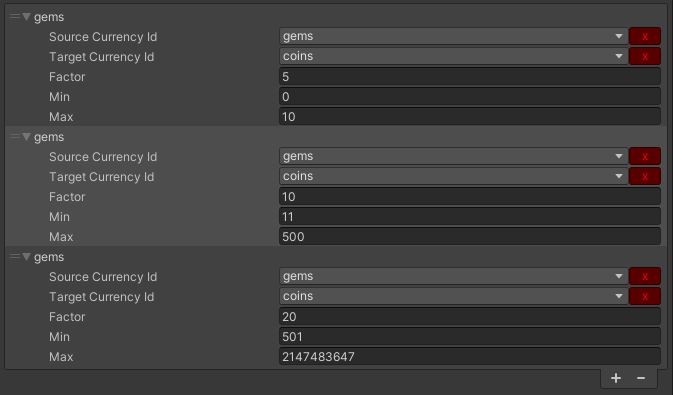
Install via UPM
Add to Unity Package Manager using this URL
https://www.pkglnk.dev/playercurrency.git README Markdown
Copy this to your project's README.md

## Installation
Add **FRP Player Currency** to your Unity project via Package Manager:
1. Open **Window > Package Manager**
2. Click **+** > **Add package from git URL**
3. Enter:
```
https://www.pkglnk.dev/playercurrency.git
```
[](https://www.pkglnk.dev/pkg/playercurrency)Dependencies (4)
Used By (1)
README

Player Currency
An easy to setup in game currency manager.
It uses the PersistentDataSystem to load and save data.
Usage
Call the PlayerCurrencyManager to get or add virtual currency amount to your players.
Each currency has its own unique string identifier, we advise you to include it in a list as it's shown in the GameQuest sample. By default, the tool will use CurrencyList.txt as the data list.
Retrieve the currency amount the player has
int playerGoldAmount = PlayerCurrencyManager.Instance.GetCurrencyCount("gold");
Add a certain amount of currency to the player
PlayerCurrencyManager.Instance.AddToCurrency("gold", 500);
The currency is protected to prevent going below 0.
Advanced - Money conversion
It contains a conversion system to allow you creating multiple conversion between virtual currencies (used in general as In App Purchases).
int coinAmount = PlayerCurrencyManager.Instance.GetConvertedCurrency(50, "gems", "coins");
In this case, coinAmount equals 500.
Comments
No comments yet. Be the first!
Sign in to join the conversation
Sign In