FRP Easy Loading
Set of tools to load scenes and monitor its progress.
com.fredericrp.easyloading 
Install via UPM
Add to Unity Package Manager using this URL
https://www.pkglnk.dev/easyloading.git README Markdown
Copy this to your project's README.md

## Installation
Add **FRP Easy Loading** to your Unity project via Package Manager:
1. Open **Window > Package Manager**
2. Click **+** > **Add package from git URL**
3. Enter:
```
https://www.pkglnk.dev/easyloading.git
```
[](https://www.pkglnk.dev/pkg/easyloading)Dependencies (3)
Used By (1)
README
Easy loading
Set of tools to load scenes and monitor its progress.
Usage
Scene loading - using ScreenTransition
- Put the LoadScene script in a game object on your first scene.
- Enter the scene name you want to load.
- Tick the async checkbox if you want an asynchronous loading process
- Select OnStart if you want the load to be launched as soon as the game object is loaded and enabled in your scene.
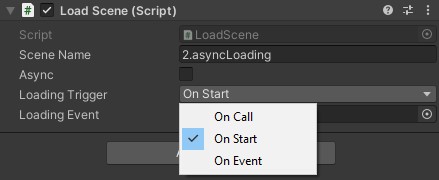
- Select OnCall to disable auto load, and call the public StartLoading() method when you want to load the next scene.
- Select OnEvent so the load is done when the specified event is raised in your scene.
- Select OnSceneLoaded if you want the new load to be triggered as soon as this object detect a scene load.
Scene loading - not using ScreenTransition
- Put the LoadScene script in a game object on your first scene.
- Enter the scene name you want to load.
- Tick the async checkbox if you want an asynchronous loading process
- Select OnStart if you want the load to be launched as soon as the game object is loaded and enabled in your scene.
You can select OnCall to disable auto load, and call the public StartLoading() method when you want to load the next scene. Or you can select OnEvent so the load is done when the specified event is raised in your scene. Or select OnSceneLoaded if you want the new load to be triggered as soon as this object detect a scene load.
Loading object manager
This manager allows to chain load multiple objects before starting to load the next scene. It is useful if you have heavy components to load and must be sure they are loaded one after another (like a translation file that must be loaded before showing them as tips for instance).
- Put the LoadingObjectManager in a game object on your scene.
- Add multiple components in the object list
- Set the LoadScene object.
Starting from the first, it will enable each GameObject attached to the component if not already. If the component implements the IShouldWait interface, it will yield until the component set the initialization as complete, otherwise it waits for the end of frame. Loop until all linked components are initialized. Wait for one last frame, then call the StartLoading function on the LoadScene linked object.
Demo
See the FourScenesTemplate project for a full demo of this easy loading package. More information will be share on my Medium profile.
Comments
No comments yet. Be the first!
Sign in to join the conversation
Sign In