Outline
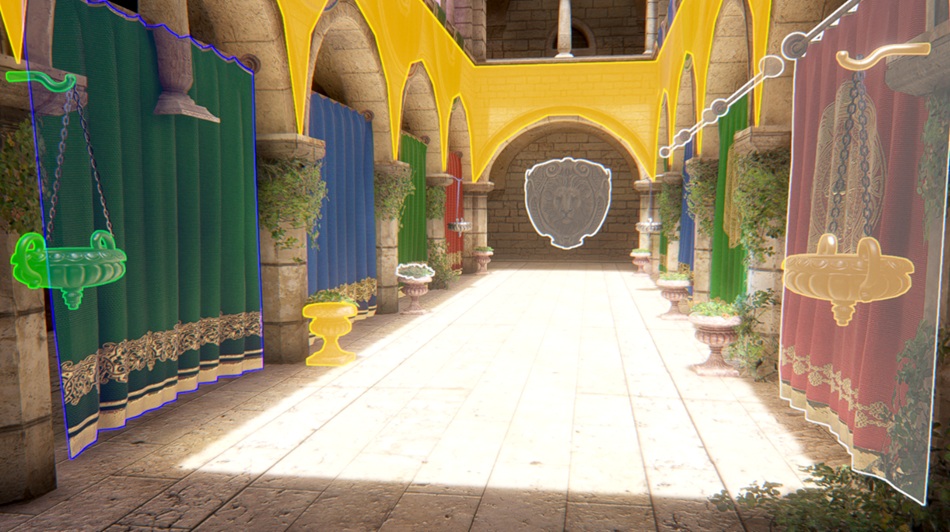
Render feature to render outlines for objects. Unity 6000.3.0 or above is required.
com.cqf.outline Install via UPM
Add to Unity Package Manager using this URL
https://www.pkglnk.dev/outline.git README Markdown
Copy this to your project's README.md
Style
Preview 
## Installation
Add **Outline** to your Unity project via Package Manager:
1. Open **Window > Package Manager**
2. Click **+** > **Add package from git URL**
3. Enter:
```
https://www.pkglnk.dev/outline.git
```
[](https://www.pkglnk.dev/pkg/outline)README
About
- Unity package that includes a simple outline render feature.
- Integrated with URP volume system.
- Uses rendering layers.
- Perfect for fast prototyping, since no other components-shaders are needed.
- Unity 6000.3.0 or above is required.
Usage
- Add 4 rendering layers with the name "Outline_1", "Outline_2", "Outline_3" and "Outline_4". You can do it in "Edit->Project Settings->Tags and Layers".
- Add the outline renderer feature to you URP Renderer.
- Enable post-processing both in your camera and URP Renderer.
- Add a volume to your scene and add override: "Custom->Outline".
- Add the "Outline_1" rendering layer to the rendering layer mask of the object you want to be outlined, either through the UI or using code. The same applies to the rest of the layers that you should have added before. Each layer has different parameters in the outline volume, with the exception of outline width, represented by the "Border Size" parameter, which is the same for all of them for technical and performance reasons.
- For programmers, there is a static field called "ForceCullPass" in OutlineRendererFeature. This field can be set to true to completely prevent the associated passes to be rendered to squish extra performance. You should track which renderers you add to the outline layers, and when there are no renderers to render in any of the layers set the ForceCullPass flag to true. Rendergraph does not allow a built in way to do this.
Limitations
- Different outline widths per each outlined object is not currently supported.
- Alpha clip not supported.
- Vertex animation through vertex shaders are not supported.
Preview
No comments yet. Be the first!