Materials from Textures
Editor tool to automatically create materials from folders of textures.
wischeropp.jonas.materials-from-textures 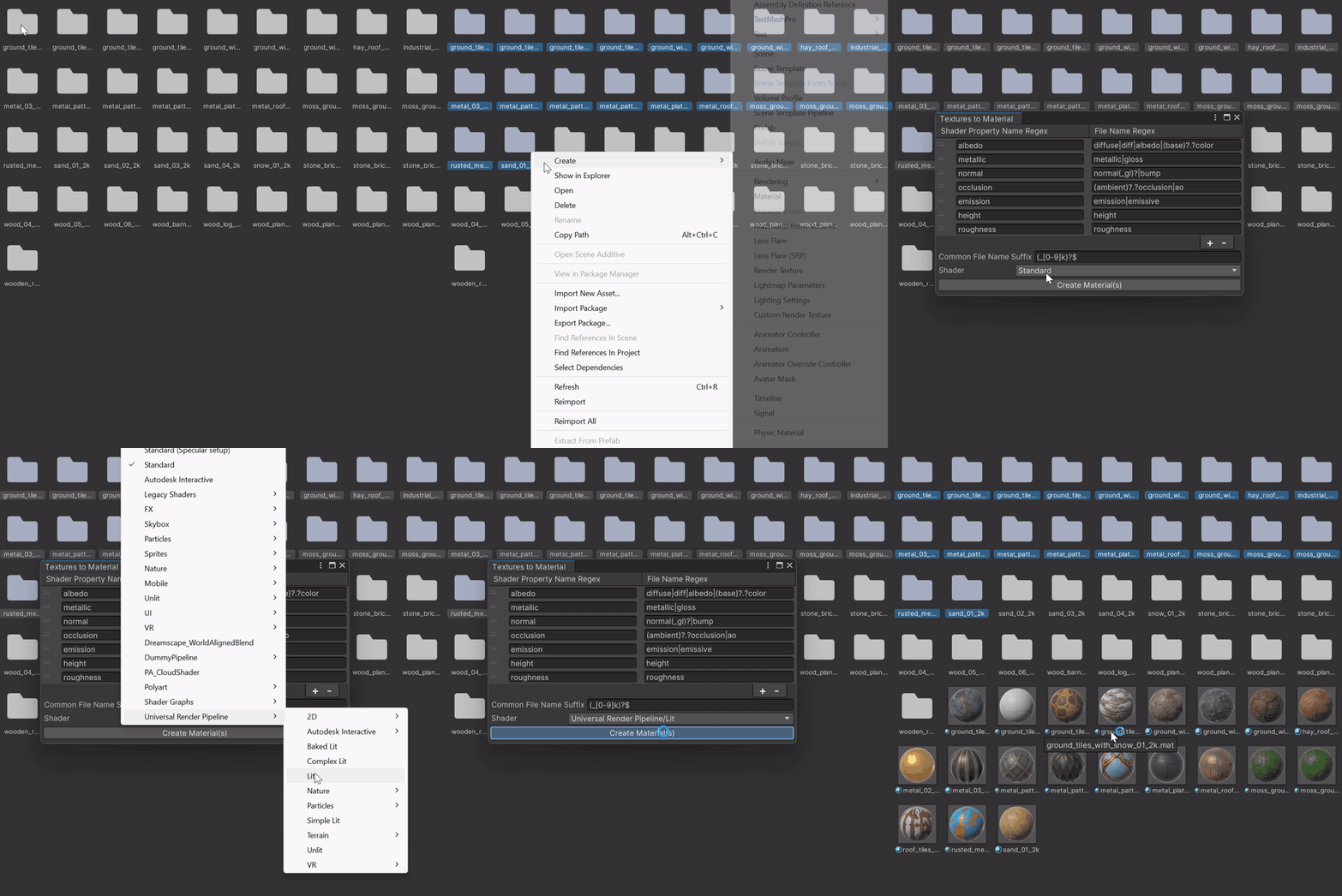
Install via UPM
Add to Unity Package Manager using this URL
https://www.pkglnk.dev/materials-from-textures.git README Markdown
Copy this to your project's README.md
Style
Preview 
## Installation
Add **Materials from Textures** to your Unity project via Package Manager:
1. Open **Window > Package Manager**
2. Click **+** > **Add package from git URL**
3. Enter:
```
https://www.pkglnk.dev/materials-from-textures.git
```
[](https://www.pkglnk.dev/pkg/materials-from-textures)README
Materials from Textures
This small editor tool makes it simple to create materials from folders of textures.
The tool assumes that one folder contains all the textures for one material.
Custom rules can be defined to match file names and shader properties using regular expressions (not case-sensitive).
How to use
- Select the folders that should be converted into materials
- Right-click on the selection
- Click
Create > Material(s) from Textures - Specify the shader
- If required adjust settings
- Click
Create Material(s)
Setup
Installation using the Package Manager:
- Click on the
+in thePackage Managerwindow - Chose
Add package from git URL... - Insert the following URL
https://github.com/JonasWischeropp/unity-materials-from-textures.git
A specific release version can be specified by appending#<version>(e.g....xtures.git#1.0.3). - Press the
Add-Button
Example folder structure
├── desert_ground_01_2k
│   ├── desert_ground_01_ambientOcclusion_2k.png
│   ├── desert_ground_01_baseColor_2k.png
│   ├── desert_ground_01_height_2k.png
│   ├── desert_ground_01_m_ao_h_r_2k.png
│   ├── desert_ground_01_metallic_2k.png
│   ├── desert_ground_01_normal_dx_2k.png
│   ├── desert_ground_01_normal_gl_2k.png
│   ├── desert_ground_01_roughness_2k.png
│   └── license.txt
├── stone_bricks_wall_07_2k
│   ├── license.txt
│   ├── stone_bricks_wall_07_ambientOcclusion_2k.png
│   ├── stone_bricks_wall_07_baseColor_2k.png
│   ├── stone_bricks_wall_07_height_2k.png
│   ├── stone_bricks_wall_07_m_ao_h_s_2k.png
│   ├── stone_bricks_wall_07_metallic_2k.png
│   ├── stone_bricks_wall_07_normal_dx_2k.png
│   ├── stone_bricks_wall_07_normal_gl_2k.png
│   └── stone_bricks_wall_07_roughness_2k.png
Additional information
- The settings file can be found under
<Project Root>/ProjectSettings/Packages/wischeropp.jonas.materials-from-textures/Settings.asset Shader Property Name Regexmatches with the description name (e.g.Albedo) not the name used in the shader (e.g._MainTex)- Due to the use of
MultiColumnListViewUnity 2022.1 or higher is required
No comments yet. Be the first!