Asset Attributes
Attributes for selecting assets with serialized fields.
com.austephnerllc.assetattributes 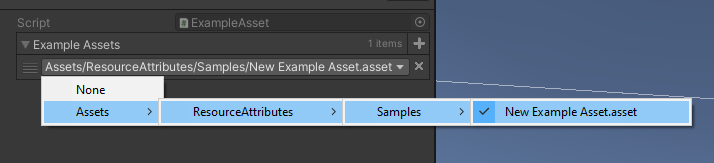
Install via UPM
Add to Unity Package Manager using this URL
https://www.pkglnk.dev/assetattributes.git README Markdown
Copy this to your project's README.md
Style
Preview 
## Installation
Add **Asset Attributes** to your Unity project via Package Manager:
1. Open **Window > Package Manager**
2. Click **+** > **Add package from git URL**
3. Enter:
```
https://www.pkglnk.dev/assetattributes.git
```
[](https://www.pkglnk.dev/pkg/assetattributes)README
Asset Attributes
Summary
Adds an attribute that can be placed on editor fields to display a dropdown selection for found assets.
Disclaimer
While this is a super useful attribute, the performance is not great and something that needs to be performed. Avoid displaying many fields with this attribute at once.
Usage
- For any
UnityEngine.Objectfield, apply theAssetSelectorattribute - Provide a directory for the attribute to improve performance
- In the Unity Editor, make a selection
public class MyBehaviour : MonoBehaviour
{
    [AssetSelector(typeof(ExampleAsset), new string[] {"ResourceAttributes/Samples/"})]
    public ExampleAsset[] exampleAssets;
}
All assets found at the given path(s) will be listed as a selectable option. You can omit the path field in the attribute's constructor but this is not recommended. Doing so will search the entire asset database which is performance costly.
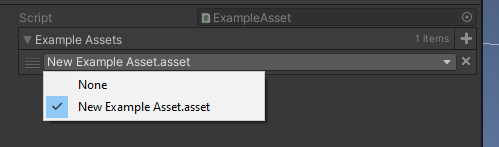
With the "allow follders" disabled:
Notes
- You can disable the folder/pathing in the dropdown to just display the asset's name.
- You can pass
trueorfalse(or nothing) to determine whether or not a "None" option should appear in the dropdown. This will set the reference tonullif selected. - You can specify what file type to search for, the system by default will use
.asset
No comments yet. Be the first!