Unity Now
▲ Vercel Now plugin for Unity. Deploy WebGL builds with ease
com.skibitsky.unity-now 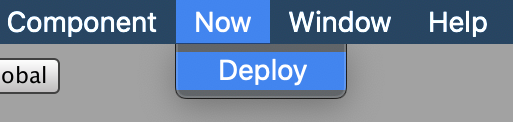
Install via UPM
Add to Unity Package Manager using this URL
https://www.pkglnk.dev/unity-now.git README Markdown
Copy this to your project's README.md

## Installation
Add **Unity Now** to your Unity project via Package Manager:
1. Open **Window > Package Manager**
2. Click **+** > **Add package from git URL**
3. Enter:
```
https://www.pkglnk.dev/unity-now.git
```
[](https://www.pkglnk.dev/pkg/unity-now)Dependencies (2)
README
Unity Now
Deploy Unity WebGL builds on Vercel serverless platform with ease.

Installation
Install via OpenUPM
The package is available on the openupm registry. It's recommended to install it via openupm-cli.
openupm add com.skibitsky.unity-now
Install via Git URL
Open Packages/manifest.json with your favorite text editor. Add the following line to the dependencies block.
{
    "dependencies": {
        "com.skibitsky.unity-now": "https://github.com/skibitsky/unity-now.git"
    }
}
Notice: Unity Package Manager records the current commit to a lock entry of the manifest.json. To update to the latest version, change the hash value manually or remove the lock entry to resolve the package.
"lock": {
  "com.skibitsky.unity-now": {
    "revision": "master",
    "hash": "..."
  }
}
Usage
- Add your access token to the Configure Now assets (Assets/ConfigureNow)
- Run Now→ Deploy from the menu bar
- Select your WebGL build
- Wait till deployment completes
Configuration
You can configure Unity Now using Configure Now scriptable object. By default it is located at Assets/ConfigureNow and contains the following properties:
| Name | Description |
|---|---|
| Token | Vercel access token. You can generate a new one here |
| Base URL | Endpoint base URL. You can change it if you need a certain server location. Read more |
| Copy URL | If enabled, Unity Now will save the deployment URL to the clipboard after the deployment is complete |
License
MIT © skibitsky
No comments yet. Be the first!