EasyProjectSetup
EasyProjectSetup is a Unity Editor tool designed to quickly generate organized project folder structures and base scenes with lighting, UI, and managers. It helps developers standardize project setups with one click.
com.ireshsampath.unity-assets-easy-project-setup 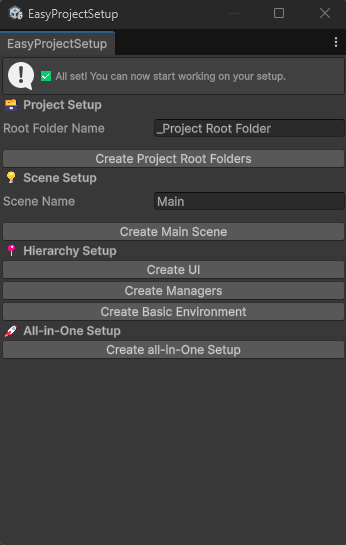
Install via UPM
Add to Unity Package Manager using this URL
https://www.pkglnk.dev/unity-assets-easy-project-setup.git README Markdown
Copy this to your project's README.md

## Installation
Add **EasyProjectSetup** to your Unity project via Package Manager:
1. Open **Window > Package Manager**
2. Click **+** > **Add package from git URL**
3. Enter:
```
https://www.pkglnk.dev/unity-assets-easy-project-setup.git
```
[](https://www.pkglnk.dev/pkg/unity-assets-easy-project-setup)README
🧩 EasyProjectSetup for Unity



🚀 Overview
EasyProjectSetup is a Unity Editor tool that lets you instantly create a clean, organized project structure and base scene with one click.
It’s designed for developers who want to start new projects faster, with a consistent hierarchy, ready-made folders, and essential objects.
Key Features:
- 📁 Auto-create standard project folders (
Scenes,Scripts,Prefabs,Materials,Textures) - 🪟 Auto-generate base scene (
Main.unity) - 💡 Adds Directional Light, Main Camera, and Post-Processing Volume
- 🖥️ Creates UI Canvas & EventSystem
- ⚙️ Includes basic Managers and Environment objects
- 🧩 Works in both URP and HDRP (with volume profile auto-setup)
- 🪶 Lightweight and easy to customize
📦 Installation
Option A — Install via Unity Package Manager (Git URL)
- Open Unity → Window → Package Manager
- Click + → Add package from Git URL
- Paste the following: https://github.com/IreshSampath/unity-tools-easy-project-setup.git
- Click Install
🧰 Quick Start
✅ Step 1 — Open the Tool
- In Unity, go to Tools → EasyProjectSetup
- The Project Setup Tool window will appear in the Editor

✅ Step 2 — Create Root Folders
- Enter your custom root folder name (default:
_Project Root Folder) - Click Create Project Root Folders
- The following structure will be created:
Assets/ └── _Project Root Folder/ ├── Scenes/ ├── Scripts/ ├── Prefabs/ ├── Materials/ └── Textures/
✅ Step 3 — Generate Base Scene
Click Create Main Scene to automatically generate:
- Empty base scene
- Auto-saved scene
✅ Step 4 — Add Hierarchy Elements
Use the extra buttons to add:
- Create UI → Adds Canvas & EventSystem
- Create Managers → Adds AppManager & UIManager placeholders
- Create Basic Environment → Adds Environment root, lighting, and camera setup
- Create All-in-One Setup → Builds everything together
⚙️ Example Workflow
| Action | Result |
|---|---|
| Create Project Root Folders | Sets up base folders |
| Create Main Scene | Generates and saves base scene |
| Create UI | Adds Canvas and EventSystem |
| Create Managers | Adds App and UI Manager GameObjects |
| Create Basic Environment | Adds light, camera, and post-processing |
| Create All-in-One Setup | Does everything above automatically |
📜 License
This project is licensed under the MIT License — free for both commercial and personal use.
🙏 Thank You
Thanks for using EasyProjectSetup!
If this helped speed up your workflow, consider giving it a ⭐ on GitHub or contributing improvements.
👤 Author
Iresh Sampath
🔗 LinkedIn Profile
No comments yet. Be the first!