UI Toolkit Particle System
Particle System for UI Toolkit
com.mainragames.uitoolkit-particlesystem 
Install via UPM
Add to Unity Package Manager using this URL
https://www.pkglnk.dev/uitoolkit-particlesystem.git?path=Packages/UIToolkitParticleSystem README Markdown
Copy this to your project's README.md

## Installation
Add **UI Toolkit Particle System** to your Unity project via Package Manager:
1. Open **Window > Package Manager**
2. Click **+** > **Add package from git URL**
3. Enter:
```
https://www.pkglnk.dev/uitoolkit-particlesystem.git?path=Packages%2FUIToolkitParticleSystem
```
[](https://www.pkglnk.dev/pkg/uitoolkit-particlesystem)README


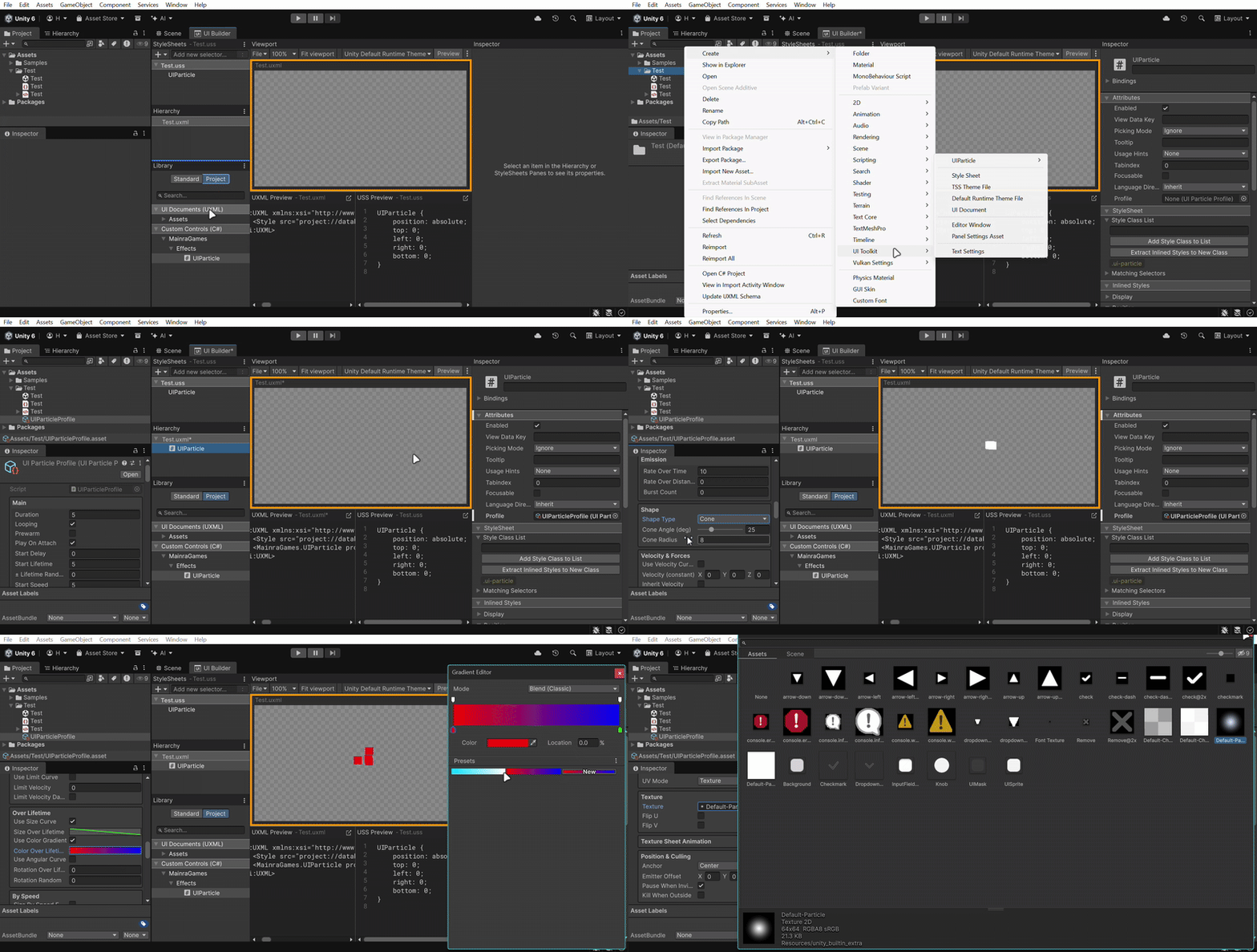
UIToolkit ParticleSystem enables you to create ParticleSystem in the Unity UIBuilder.
Features
Easy to edit with UIBuilder
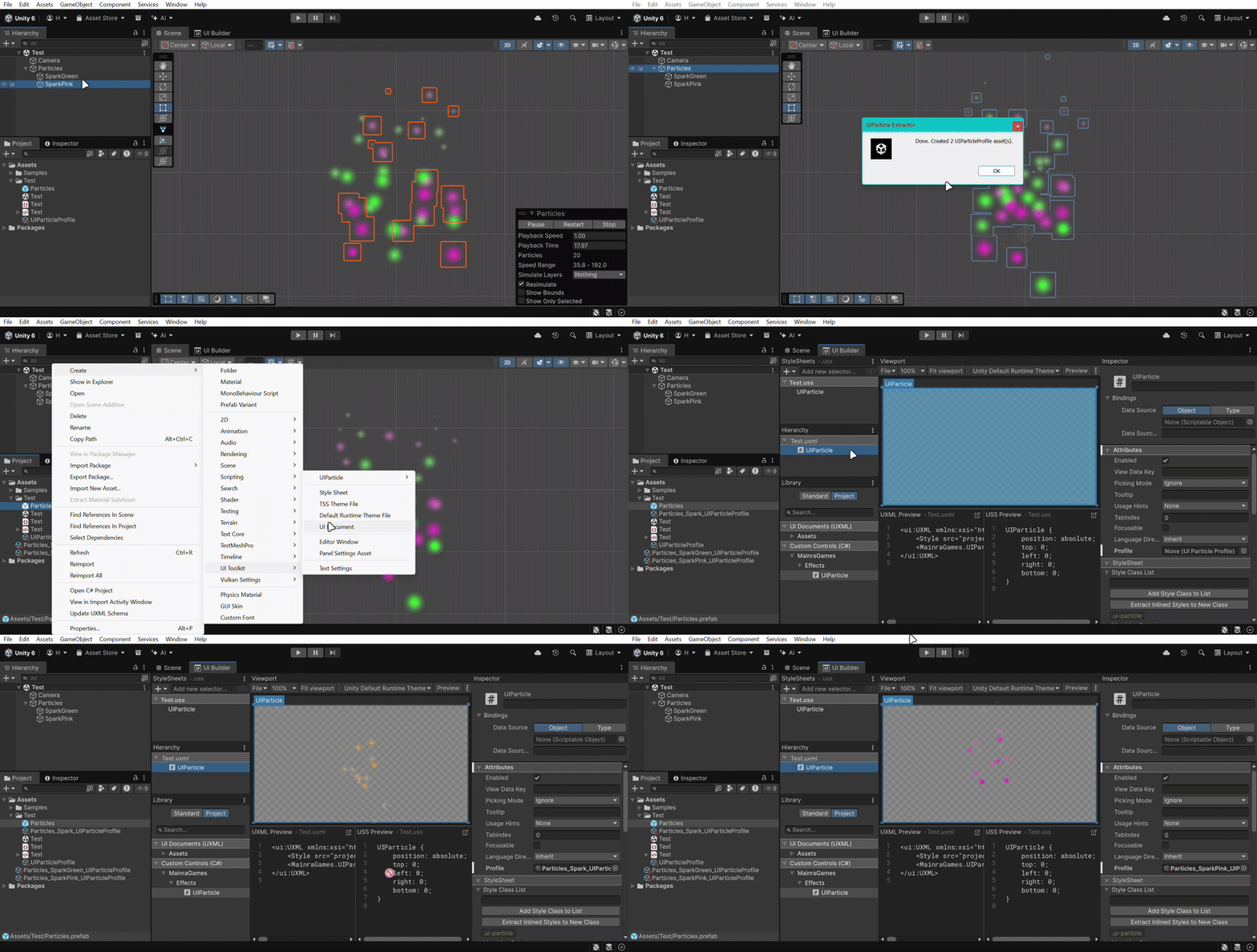
Can extract existing ParticleSystem
Installation
Using Open UPM
Install via Package Manager
Open
Edit > Project Settings > Package ManagerAdd a new Scoped Registry (or edit the existing OpenUPM entry)
Name package.openupm.comURL https://package.openupm.comScope(s) com.annulusgames.alchemycom.mainragames.uitoolkit-particlesystemClick
ApplyOpen
Window > Package Management > Package ManagerClick
+Select
Install package by name...Paste
com.mainragames.uitoolkit-particlesysteminto NameClick
Install
Install via Project Manifest
Merge the snippet to Packages/manifest.json
{
    "scopedRegistries": [
        {
            "name": "package.openupm.com",
            "url": "https://package.openupm.com",
            "scopes": [
                "com.annulusgames.alchemy",
                "com.mainragames.uitoolkit-particlesystem"
            ]
        }
    ],
    "dependencies": {
        "com.mainragames.uitoolkit-particlesystem": "1.0.4"
    }
}
Install via Command-Line
(Optional) install openupm-cli. Ignore if already installed.
npm install -g openupm-cliGo to your unity project directory
cd YOUR_UNITY_PROJECT_DIRInstall package: com.mainragames.uitoolkit-particlesystem
openupm add com.mainragames.uitoolkit-particlesystem
Using Git URL
Install via Package Manager
Open
Edit > Project Settings > Package ManagerClick
+Select
Install package from git URL...(Optional) if you haven't installed Alchemy, Enter the following URL First:
https://github.com/annulusgames/Alchemy.git?path=/Alchemy/Assets/AlchemyEnter the following URL:
https://github.com/MainraStudio/UI-Toolkit-Particle-System.git?path=Packages/UIToolkitParticleSystemClick
Install
Install via Project Manifest
Merge the snippet to Packages/manifest.json
{
    "dependencies": {
        "com.mainragames.uitoolkit-particlesystem": "https://github.com/MainraStudio/UI-Toolkit-Particle-System.git?path=Packages/UIToolkitParticleSystem"
    }
}
(Optional) if you haven't installed Alchemy
{
    "dependencies": {
        "com.annulusgames.alchemy": "https://github.com/annulusgames/Alchemy.git?path=/Alchemy/Assets/Alchemy"
    }
}
No comments yet. Be the first!