TypeWrap
C# source generator to simplify the creation of wrapper types.
com.laicasaane.typewrap Install via UPM
Add to Unity Package Manager using this URL
https://www.pkglnk.dev/typewrap.git?path=Packages/com.laicasaane.typewrap README Markdown
Copy this to your project's README.md

## Installation
Add **TypeWrap** to your Unity project via Package Manager:
1. Open **Window > Package Manager**
2. Click **+** > **Add package from git URL**
3. Enter:
```
https://www.pkglnk.dev/typewrap.git?path=Packages%2Fcom.laicasaane.typewrap
```
[](https://www.pkglnk.dev/pkg/typewrap)README
TypeWrap
This library utilizes Roslyn Source Generator to generate type wrappers for any C# type.
Features
- Any C# type can be wrapped, with an exception of
dynamic. - Wrappers can be a
struct, aclass, or arecord.- A
recordwrapper can also be generic if needed.
- A
- Wrappers have
implicitandexplicitoperators to convert between itself and the original type. - All public members of the original type are exposed in the wrapper. Supported members are fields, properties, events, indexers, methods, and operators.
IEquatable<T>andIComparable<T>are implemented for the wrapper if the original type allows them.- Equality operators (
==,!=) are overloaded for the wrapper if the original type allows them.
Installation
Requirements
- Unity 2022.3 or later
Unity Package Manager
Open menu
Window->Package Manager.Click the
+button at the top-left corner, then chooseAdd package from git URL....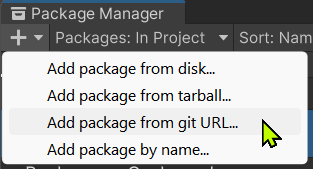
Enter the package URL
https://github.com/laicasaane/TypeWrap.git?path=/Packages/com.laicasaane.typewrap#1.2.5
OpenUPM
- Install OpenUPM CLI.
- Run the following command in your Unity project root directory:
openupm add com.laicasaane.typewrap
Usage
[WrapType] Attribute
- Use this attribute if the wrapper itself is either a
structor aclass.- In case of a
class, it must not inherit from any other class. - The wrapper must be
partial.
- In case of a
- By default, the underlying type name is
value. You can change it by specifying thememberNameargument. - By default, a type converter is generated for the wrapper. You can exclude it by specifying the
ExcludeConverterproperty.
[WrapType(typeof(int))]
public partial struct IntWrapper { }

[WrapType(typeof(List<int>), memberName: "wrappedList")]
public partial class ListInt { }

[WrapType(typeof(IDisposable), ExcludeConverter = true)]
public readonly partial struct DisposableObject { }
[WrapRecord] Attribute
- Use this attribute if the wrapper itself is either a
record structor arecord class.- In case of a
record class, it must not inherit from any other class. - The wrapper must be
partial.
- In case of a
- The primary constructor of the record must have exactly 1 parameter.
- By default, a type converter is generated for the wrapper.
You can exclude it by specifying the
ExcludeConverterproperty.
[WrapRecord(ExcludeConverter = true)]
public partial record struct IntWrapper(int Value);

[WrapRecord]
public partial record class ListT<T>(List<T> _);

[WrapRecord]
public readonly partial record struct Coord2D(Vector2Int _);
A sample for generated code
For this user-written code:
public enum FruitKind { Apple, Banana, Orange, }

[WrapRecord]
public readonly partial record struct FruitKindValue(FruitKind _);
Source generator will emit something like this:
[!NOTE] The file above has been sanitized to a degree to improve readability within this tutorial. The actual generated code includes additional attributes and fully qualified type names to ensure correctness and avoid ambiguities.
Notes
To have
recordin Unity, you'll need- Unity 2022.3 or later
- Enable
C# 10feature by placing thiscsc.rspfile inside yourAssetsfolder.- Or better: place it inside the folder that contains an Assembly Definition (
.asmdeffile).
- Or better: place it inside the folder that contains an Assembly Definition (
To have
readonly recordin any assembly (or.asmdef):- Copy this
IsExternalInit.csfile into that assembly.- Or better: copy to the core assembly which is referenced by other assemblies.
- Copy this
You might also want to place this
Directory.Build.propsfile in yourAssetsand the root of your project to enable theC# 10feature for the code editor.
[!IMPORTANT] If you're using Visual Studio or VSCode and have installed packagg
com.unity.ide.visualstudioversion2.0.24or later, you don't needDirectory.Build.propsfile. Because the compiler option-langversionspecified incsc.rspfile will be respected and applied to the generated.csprojfiles.
No comments yet. Be the first!