Gameframe.Tunes
Automatically pauses music (iTunes/Spotify) on Windows and macOS when entering Unity play mode, then intelligently resumes playback only if it was actually paused. Toggle the feature on or off via the Window/Tunes menu to maintain your workflow without manual interruption.
com.gameframe.tunes 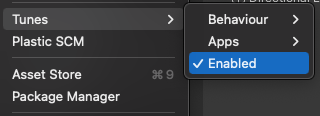
Install via UPM
Add to Unity Package Manager using this URL
https://www.pkglnk.dev/tunes.git README Markdown
Copy this to your project's README.md

## Installation
Add **Gameframe.Tunes** to your Unity project via Package Manager:
1. Open **Window > Package Manager**
2. Click **+** > **Add package from git URL**
3. Enter:
```
https://www.pkglnk.dev/tunes.git
```
[](https://www.pkglnk.dev/pkg/tunes)README

Gameframe.Tunes 👋
Automatically pause Music (iTunes/Spotify) on Windows and OSX when entering play mode
Intelligently checks if music is playing and remembers if it actually paused playing music so that it will unpause only if it paused.
Quick Package Install
Using UnityPackageManager (for Unity 2019.3 or later)
Open the package manager window (menu: Window > Package Manager)
Select "Add package from git URL...", fill in the pop-up with the following link:
https://github.com/coryleach/UnityTunes.git#0.3.1
Using UnityPackageManager (for Unity 2019.1 or later)
Find the manifest.json file in the Packages folder of your project and edit it to look like this:
{
  "dependencies": {
    "com.gameframe.tunes": "https://github.com/coryleach/UnityTunes.git#0.3.1",
    ...
  },
}
Usage
When enabled this package will automatically pause the Music app or Spotify on Mac OS.
To toggle Enable/Disable go to the Window/Tunes menu and select the 'Enable' option to toggle on or off.
Author
👤 Cory Leach
- Twitter: @coryleach
- Github: @coryleach
Show your support
Give a ⭐️ if this project helped you!
Please consider supporting it either by contributing to the Github projects (submitting bug reports or features and/or creating pull requests) or by buying me coffee using any of the links below. Every little bit helps!

This README was generated with ❤️ by Gameframe.Packages
Comments
No comments yet. Be the first!
Sign in to join the conversation
Sign In