Tsuki Suite
A tool suite created to make Unity development easier
com.lunari.tsuki 
Install via UPM
Add to Unity Package Manager using this URL
https://www.pkglnk.dev/tsuki.git#upm README Markdown
Copy this to your project's README.md
Style
Preview 
## Installation
Add **Tsuki Suite** to your Unity project via Package Manager:
1. Open **Window > Package Manager**
2. Click **+** > **Add package from git URL**
3. Enter:
```
https://www.pkglnk.dev/tsuki.git#upm
```
[](https://www.pkglnk.dev/pkg/tsuki)README
TsukiSuite



TsukiSuite is an open source, free for commercial use suite of libraries created for making Unity development more pleasant.
Each library can be compared as a version of Google's Guava, but created for Unity
Currently, four of those exists, but more will be added as the need for them surface
- Tsuki Runtime (Core libraries & algorithms)
- Tsuki Entities (Gameplay Architecture)
- Tsuki Editor (Editor specific libraries)
- Tsuki Graphs (Graph Theory libraries)
Installation
- Install Unity 2020.3 or older
- Open Unity Package Manager.
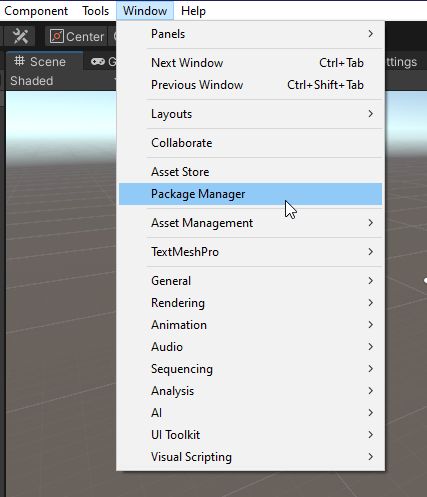
- Click on the the '+' icon, add package from git URL, as paste the following url:
https://github.com/LunariStudios/TsukiSuite.git#upm.
- Wait for the download and you are done! You can now freely use Tsuki
Features and examples
- Collections
List<int> list = new List<int>();
if (list.IsEmpty()) {
    Debug.Log("Is empty!");
}
public struct Data { public string Name; public int Priority; } List<Data> data = PopulateListWithRandomData(); Data withHighestPriority = data.MaxBy(d => d.Priority) - Colors
Color color = Colors.RandomColor();
Color newColor = color.SetHue(Mathf.Sin(Time.time));
Color a = new Color(1, 0, 1, 1); ColorHSV b = a; ColorHSV colorHSV = new ColorHSV(0, 1, 1, 1); Color c = colorHSV; - Editor
// Bonus: A list of hidden UnityEditor GUIStyles! var style = GUIStyles.Get(GUIStyles.box); var labelRect = position.GetLine(2); EditorGUI.LabelField(labelRect, "I am on the third with the console info style!", style); - UI
// No need to declare a copy of Graphic.color Text.SetAlpha(Mathf.Sin(Time.time)); Text.SetHue(Mathf.Cos(Time.time)); - And many more
Planned features
- Code Generation tool using T4 templates.
- Best practices knowledge base and bad practice detection.
No comments yet. Be the first!