singleton
A robust singleton module for Unity that works seamlessly in both Editor and Runtime environments. Features lazy loading, zero overhead, guaranteed single instantiation across script recompilation, domain reloads, and scene changes. Includes scene-independent instances, child GameObject support, and a visual inspector window for managing active singletons. Supports customizable instantiation and destruction timing through attributes and overridable methods.
com.bbbirder.singleton Install via UPM
Add to Unity Package Manager using this URL
https://www.pkglnk.dev/singleton.git README Markdown
Copy this to your project's README.md

## Installation
Add **singleton** to your Unity project via Package Manager:
1. Open **Window > Package Manager**
2. Click **+** > **Add package from git URL**
3. Enter:
```
https://www.pkglnk.dev/singleton.git
```
[](https://www.pkglnk.dev/pkg/singleton)README
可以在Editor和Runtime混用的Unity单例模块。稳定可靠,懒加载,无额外开销,任何情况都不会出现多实例化。



Features
- 兼容所有场景,稳定可靠的提供一个单例:
- Editor和Runtime混合使用
- 中途重新编译脚本
- 不同的
Reload Domain选项 - 场景切换
- etc
- 可以包含子物体:基于MonoBehaviour,可添加子GameObject
- 独立于场景:单例默认使用HideFlags隐藏,不属于任何场景,不需要考虑入口场景
- 可检索:可视化窗口检索单例列表(Window/bbbirder/Singletons)
Basic Usage
只需要继承Singleton<T>
using UnityEngine;
using com.bbbirder.unity;
public class YourComponent:Singleton<YourComponent>{
    protected override void Awake(){
        SayHello();
    }
    public void SayHello(){
        print("hello,world");
    }
}
需要调用的地方 :
YourComponent.Instance.SayHello();
通过Window/bbbirder/Singletons窗口查看当前的单例
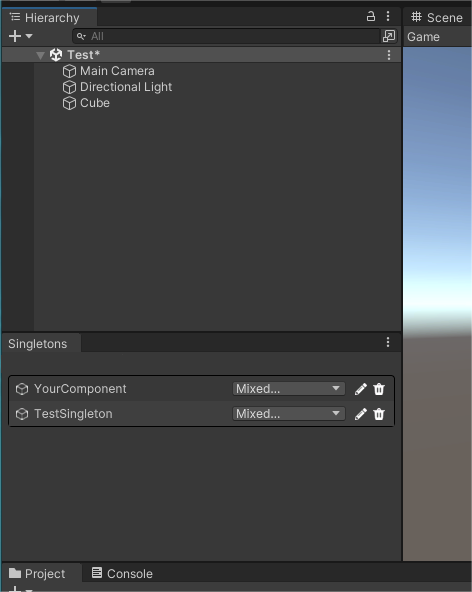
More Controls
指定实例化时机
[assembly: SingletonAutoLoad(typeof(Manager))]
public class Manager:Singleton<Manager>{ //Manager 将会自动实例化

}
SingletonAutoLoadAttribute接收2个参数:
- 目标单例类型
- 实例化时机 enum
SingletonCreateConditionLazyLoad懒加载,通过Instance获取时才实例化。无SingletonAutoLoad属性时默认模式DomainReload即时加载,在脚本开始运行前实例化。SingletonAutoLoad缺省选项EnterPlay进入播放模式加载
使用形如
[assembly:]的特性使得SingletonAutoLoadAttribute在内部检索所有单例类型时消耗小,且非常迅速。可以放心的在Runtime环境下使用此模块。
指定销毁时机
public class Manager:Singleton<Manager>{
    public override SingletonDestroyCondition DestroyCondition => SingletonDestroyCondition.ExitEdit;
}
SingletonDestroyCondition 具有以下选项:
- Never 不自动销毁
- SceneUnload 场景卸载时
- ReloadDomain 脚本重加载时 (默认)
- ExitPlay 切出播放模式时
- ExitEdit 切出编辑模式时
自定义实例化方法
public class TestSingleton : Singleton<TestSingleton>
{
    protected new static TestSingleton CreateInstance(){
        var go = Singleton<TestSingleton>.CreateInstance();
        go.name += " (Singleton)";
        return go;
    }
}
Comments
No comments yet. Be the first!
Sign in to join the conversation
Sign In