Service Kit

Lightweight dependency injection system for Unity that enables asynchronous service registration and retrieval with minimal overhead.
com.nonatomic.servicekit Install via UPM
Add to Unity Package Manager using this URL
https://www.pkglnk.dev/servicekit.git 
README Markdown
Copy this to your project's README.md

## Installation
Add **Service Kit** to your Unity project via Package Manager:
1. Open **Window > Package Manager**
2. Click **+** > **Add package from git URL**
3. Enter:
```
https://www.pkglnk.dev/servicekit.git
```
[](https://www.pkglnk.dev/pkg/servicekit)Dependencies (1)
README
Dependency Injection & Service Locator for Unity
A lightweight, ScriptableObject-based dependency injection framework for Unity. Register services with attributes, resolve them asynchronously, inject dependencies with one line of code, and let ServiceKit handle the lifecycle automatically.


Support
If you like my work then please consider showing your support for ServiceKit by giving the repo a star or buying me a brew

Installation
Add Service Kit to your Unity project via Package Manager:
- Open Window > Package Manager
- Click + > Add package from git URL
- Enter:
https://www.pkglnk.dev/servicekit.git
Features
- Attribute-Based Registration: Use
[Service(typeof(IFoo))]to declare service types - supports multiple interfaces per service. - ScriptableObject-Based: Clean, asset-based architecture that integrates seamlessly with Unity's workflow.
- Multi-Phase Initialization: A robust, automated lifecycle ensures services are registered, injected, and initialized safely.
- Async Service Resolution: Wait for services to become fully ready with cancellation and timeout support.
- Atomic 3-State Resolution: Race-condition-free optional dependency resolution distinguishes ready, registered-but-not-ready, and absent services in a single atomic check.
- UniTask Integration: Automatic performance optimization when UniTask is available - zero allocations and faster async operations.
- Fluent Dependency Injection: Elegant builder pattern for configuring service injection.
- Automatic Scene Management: Services are automatically tracked and cleaned up when scenes unload.
- Comprehensive Debugging: Built-in editor window with search, filtering, and service inspection.
- Type-Safe: Full generic support with compile-time type checking.
- Performance Optimized: Efficient service lookup with minimal overhead, enhanced further with UniTask.
- Thread-Safe: Lock-guarded async resolution, atomic registration guards, and race-condition-hardened service awaiting.
What's New in V2
For the narrative version of this release (including why ServiceKit leans into being a service locator on purpose), see the launch post: ServiceKit V2, The Async Service Locator for Unity.
Simpler Service Declarations
V2 replaces the generic ServiceKitBehaviour<T> base class with a non-generic ServiceKitBehaviour plus a [Service] attribute. This eliminates generic type parameter noise from class declarations, inheritance chains, and constraint clauses.
Before (V1):
// Generic parameter threaded through every level of the hierarchy
public abstract class BaseGameController<TInterface> : ServiceKitBehaviour<TInterface>, IGame
    where TInterface : class, IGame

public class BowlingController : BaseGameController<IBowlingController>, IBowlingController
After (V2):
// Clean inheritance, registration intent is explicit
public abstract class BaseGameController : ServiceKitBehaviour, IGame

[Service(typeof(IBowlingController))]
public class BowlingController : BaseGameController, IBowlingController
For abstract base classes with multiple generic parameters (e.g., a service type and a data type), only the ServiceKit type parameter is removed — functional generics are preserved:
// Before: two generics, one was just for ServiceKit
public abstract class ScoreService<TService, TScore> : ServiceKitBehaviour<TService>, IScoreService<TScore>
    where TService : class, IScoreService<TScore>
    where TScore : struct

// After: one generic remains — the one that actually matters
public abstract class ScoreService<TScore> : ServiceKitBehaviour, IScoreService<TScore>
    where TScore : struct

[Service(typeof(IMyScoreService))]
public class MyScoreService : ScoreService<int>, IMyScoreService
In real-world migrations this reduces hundreds of lines of generic boilerplate while making each class declaration immediately readable.
One-Line Dependency Injection
The new InjectAsync extension method replaces the common 4-method builder chain with a single call:
Before:
await _serviceKitLocator.Inject(this)
    .WithErrorHandling()
    .WithTimeout()
    .ExecuteWithCancellationAsync(destroyCancellationToken);
After:
await _serviceKitLocator.InjectAsync(this, destroyCancellationToken);
This applies default timeout (from ServiceKit Settings), the provided cancellation token, and default error handling — the configuration that 90%+ of injection call sites need. The full builder is still available when you need custom timeout values or error handlers:
// Custom configuration when defaults aren't enough
await _serviceKitLocator.Inject(this)
    .WithTimeout(10f)
    .WithErrorHandling(ex => HandleMyError(ex))
    .ExecuteWithCancellationAsync(destroyCancellationToken);
Atomic Service Resolution
The new TryResolveService method replaces the error-prone two-call pattern of TryGetService followed by IsServiceRegistered with a single atomic check:
var status = locator.TryResolveService(typeof(IMyService), out var service);

switch (status)
{
    case ServiceResolutionStatus.Ready:           // service is populated
        break;
    case ServiceResolutionStatus.RegisteredNotReady: // registered, still initializing
        break;
    case ServiceResolutionStatus.NotRegistered:      // does not exist
        break;
}
Both checks happen under a single lock, eliminating the race window where a service could register between the two calls.
Race Condition Hardening
- GetServiceAsync — Task forwarding is now set up inside the lock, preventing a race where the shared
TaskCompletionSourcecould complete before forwarding was established - UseLocator —
Interlocked.CompareExchangeregistration guard prevents double-registration whenUseLocatoris called concurrently withAwake - Circular Dependency Detection — Uses
Typereferences instead of string name matching, preventing false matches between types with similar names - DontDestroyOnLoad detection — Strengthened to require both scene name and
buildIndex == -1
Roslyn Analyzers
| Rule | Severity | Description |
|---|---|---|
| SK003 | Error | [Service(typeof(IFoo))] on a class that doesn't implement IFoo |
| SK005 | Error | ServiceKitBehaviour subclass overrides Awake() without calling base.Awake() |
These catch at compile time what would otherwise be silent runtime failures. SK003 restores the type safety that the old generic pattern provided, while SK005 prevents the most common lifecycle mistake.
Quick Start
1. Create a ServiceKit Locator
Right-click in your project window and create a ServiceKit Locator:
Create > ServiceKit > ServiceKitLocator
2. Define Your Services
public interface IPlayerService
{
    void SavePlayer();
    void LoadPlayer();
    int GetPlayerLevel();
}

public class PlayerService : IPlayerService
{
    private int _playerLevel = 1;

    public void SavePlayer() => Debug.Log("Player saved!");
    public void LoadPlayer() => Debug.Log("Player loaded!");
    public int GetPlayerLevel() => _playerLevel;
}
3. Register Services
Plain C# services — register in a bootstrap:
public class GameBootstrap : MonoBehaviour
{
    [SerializeField] private ServiceKitLocator _serviceKit;

    private void Awake()
    {
        // Fluent API - register and ready in one chain
        _serviceKit.Register(new PlayerService())
            .As<IPlayerService>()
            .Ready();

        // Multi-type registration - one instance, multiple interfaces
        _serviceKit.Register(new AudioManager())
            .As<IAudioService>()
            .As<IMusicService>()
            .WithTags("audio", "core")
            .Ready();
    }
}
MonoBehaviour services — use ServiceKitBehaviour and place them in the scene. Registration, injection, and readiness are all handled automatically:
[Service(typeof(IPlayerController))]
public class PlayerController : ServiceKitBehaviour, IPlayerController
{
    [InjectService] private IPlayerService _playerService;

    protected override void InitializeService()
    {
        // Called after all dependencies are injected and ready
        _playerService.LoadPlayer();
    }
}
4. Inject Services
public class PlayerUI : MonoBehaviour
{
    [SerializeField] private ServiceKitLocator _serviceKit;

    // Mark fields for injection
    [InjectService] private IPlayerService _playerService;

    private async void Awake()
    {
        // One-liner: default timeout, cancellation, and error handling
        await _serviceKit.InjectAsync(this, destroyCancellationToken);

        // Or configure each option with the builder
        // await _serviceKit.Inject(this)
        //     .WithTimeout(5f)
        //     .WithCancellation(destroyCancellationToken)
        //     .WithErrorHandling()
        //     .ExecuteAsync();

        _playerService.LoadPlayer();
    }
}
5. Create MonoBehaviour Services with ServiceKitBehaviour
For services that need to be MonoBehaviours, use the ServiceKitBehaviour base class with the [Service] attribute:
// Single interface registration
[Service(typeof(IPlayerController))]
public class PlayerController : ServiceKitBehaviour, IPlayerController
{
    [InjectService] private IPlayerService _playerService;

    protected override void InitializeService()
    {
        // Called after dependencies are injected
        _playerService.LoadPlayer();
        Debug.Log("Player controller ready!");
    }
}

// Multiple interface registration - register one instance under multiple types
[Service(typeof(IAudioService), typeof(IMusicService))]
public class AudioManager : ServiceKitBehaviour, IAudioService, IMusicService
{
    public void PlaySound(string id) { /* ... */ }
    public void PlayMusic(string id) { /* ... */ }
}

// No attribute = registers as concrete type
public class GameSettings : ServiceKitBehaviour
{
    public int Volume { get; set; }
    // Accessible via: serviceKit.GetService<GameSettings>()
}
UniTask Integration
ServiceKit provides automatic optimization when UniTask is installed in your project. UniTask is a high-performance, zero-allocation async library specifically designed for Unity.
Automatic Detection
ServiceKit automatically detects when UniTask is available and seamlessly switches to use UniTask APIs for enhanced performance:
// Same code, different performance characteristics:
await serviceKit.GetServiceAsync<IPlayerService>();

// With UniTask installed:   → Zero allocations, faster execution
// Without UniTask:          → Standard Task performance
Installation
Add UniTask to your Unity project via Package Manager:
- Open Window > Package Manager
- Click + > Add package from git URL
- Enter:
https://www.pkglnk.dev/unitask.git?path=src/UniTask/Assets/Plugins/UniTask
```[sw.js](https://github.com/PaulNonatomic/ServiceKit/blob/main/../../../../beer-tilt/sw.js)
[](https://www.pkglnk.dev/pkg/unitask)
### Performance Benefits
When UniTask is available, ServiceKit automatically provides:
- **🚀 2-3x Faster Async Operations**: For immediately completing operations
- **📉 50-80% Less Memory Allocation**: Reduced GC pressure and frame drops
- **⚡ Zero-Allocation Async**: Most async operations produce no garbage
- **🎯 Unity-Optimized**: Better main thread synchronization and PlayerLoop integration
### Usage Examples
The same ServiceKit code works with both Task and UniTask - no changes needed:
```csharp
[Service(typeof(IPlayerController))]
public class PlayerController : ServiceKitBehaviour, IPlayerController
{
[InjectService] private IPlayerService _playerService;
[InjectService] private IInventoryService _inventoryService;
// Automatically uses UniTask when available for better performance
protected override async UniTask InitializeServiceAsync()
{
await _playerService.LoadPlayerDataAsync();
await _inventoryService.LoadInventoryAsync();
}
}
Multiple service resolution is also optimized:
// UniTask.WhenAll is more efficient than Task.WhenAll
var (player, inventory, audio) = await UniTask.WhenAll(
    serviceKit.GetServiceAsync<IPlayerService>(),
    serviceKit.GetServiceAsync<IInventoryService>(),
    serviceKit.GetServiceAsync<IAudioService>()
);
Best Practices with UniTask
- Mobile Games: UniTask's zero-allocation benefits are most noticeable on mobile devices
- Complex Scenes: Projects with many services see the biggest improvements
- Frame-Critical Code: Use for smooth 60fps gameplay where every allocation matters
- Memory-Constrained Platforms: VR, WebGL, and older devices benefit significantly
Roslyn Analyzer Support
ServiceKit includes integrated support for Roslyn Analyzers to help you write better code with real-time analysis and suggestions specifically tailored for ServiceKit development.
Features
The ServiceKit Analyzers provide:
- Code analysis for common ServiceKit patterns and best practices
- Real-time suggestions to improve your service implementations
- Compile-time warnings for potential issues with dependency injection
- Code fixes to automatically resolve common problems
Installation
ServiceKit includes a built-in tool to download and manage the Roslyn Analyzers:
- Open the ServiceKit Settings window:
Edit > Project Settings > ServiceKit - Navigate to the Developer Tools section
- Click Download Analyzers to automatically fetch the latest version from GitHub
- The analyzers will be installed to
Assets/Analyzers/ServiceKit/
Manual Installation
You can also manually download the analyzers:
- Visit the ServiceKit Analyzers releases page
- Download the latest
ServiceKit.Analyzers.dll - Place it in
Assets/Analyzers/ServiceKit/in your Unity project - Unity will automatically recognize and apply the analyzers
Managing Analyzers
Through the ServiceKit Settings window, you can:
- Update: Download the latest version to get new analysis rules and improvements
- Remove: Uninstall the analyzers if you no longer need them
- View Details: See the installed version, file size, and last modified date
Contributing to Analyzers
The ServiceKit Analyzers are open source! If you'd like to contribute new analysis rules or improvements:
- Visit the ServiceKit Analyzers repository
- Check out the contribution guidelines
- Submit issues for bugs or feature requests
- Create pull requests with your improvements
The analyzer repository includes documentation on:
- How to build custom analyzers for ServiceKit
- Adding new diagnostic rules
- Creating code fix providers
- Testing analyzer implementations
Advanced Usage
Using ServiceKitBehaviour Base Class
For the most robust and seamless experience, inherit from ServiceKitBehaviour and use the [Service] attribute to specify which interface(s) your service implements. This base class automates a sophisticated multi-phase initialization process within a single Awake() call, ensuring that services are registered, injected, and made ready in a safe, deterministic order.
Key Features:
- Attribute-based registration: Use
[Service(typeof(IFoo), typeof(IBar))]to register against multiple types - Concrete type fallback: If no
[Service]attribute is provided, the service registers against its concrete class type - Simplified generics: No more confusing generic inheritance chains
It handles the following lifecycle automatically:
- Registration: The service immediately registers itself against all declared types, making it discoverable.
- Dependency Injection: It asynchronously waits for all services marked with
[InjectService]to become fully ready. - Custom Initialization: It provides
InitializeServiceAsync()andInitializeService()for you to override with your own setup logic. - Readiness: After your initialization, it marks the service as ready for all registered types, allowing other services that depend on it to complete their own initialization.
// Single interface registration
[Service(typeof(IPlayerController))]
public class PlayerController : ServiceKitBehaviour, IPlayerController
{
    [InjectService] private IPlayerService _playerService;
    [InjectService] private IInventoryService _inventoryService;

    // This is the new hook for your initialization logic.
    // It's called after dependencies are injected, but before this service is marked as "Ready".
    protected override void InitializeService()
    {
        // Safe to access injected services here
        _playerService.LoadPlayer();
        _inventoryService.LoadInventory();

        Debug.Log("Player controller initialized with all dependencies!");
    }

    // For async setup, you can use the async override:
    // Note: Returns UniTask when available, Task otherwise - same code works for both!
    protected override async UniTask InitializeServiceAsync()
    {
        // Example: load data from a web request or file
        await _inventoryService.LoadFromCloudAsync(destroyCancellationToken);
    }

    // Optional: Handle injection failures gracefully
    protected override void HandleDependencyInjectionFailure(Exception exception)
    {
        Debug.LogError($"Failed to initialize player controller: {exception.Message}");

        if (exception is TimeoutException)
        {
            Debug.Log("Services took too long to become available");
        }
        else if (exception is ServiceInjectionException)
        {
            Debug.Log("Required services are not registered or failed to become ready");
            gameObject.SetActive(false); // Disable this component
        }
    }
}

// Multi-type registration - register under multiple interfaces
[Service(typeof(IAudioService), typeof(IMusicService), typeof(ISoundEffects))]
public class UnifiedAudioManager : ServiceKitBehaviour, IAudioService, IMusicService, ISoundEffects
{
    public void PlaySound(string id) { /* ... */ }
    public void PlayMusic(string id) { /* ... */ }
    public void StopAll() { /* ... */ }
}

// Concrete type registration (no attribute needed)
public class GameSettings : ServiceKitBehaviour
{
    public int Volume { get; set; }
    // Registers as typeof(GameSettings)
}
Fluent Registration API
For non-MonoBehaviour services, use the fluent registration API for clean, chainable configuration:
public class GameBootstrap : MonoBehaviour
{
    [SerializeField] private ServiceKitLocator _serviceKit;

    private void Awake()
    {
        // Simple registration
        _serviceKit.Register(new PlayerService())
            .As<IPlayerService>()
            .Ready();

        // Multi-type registration - one instance accessible via multiple interfaces
        _serviceKit.Register(new UnifiedAudioManager())
            .As<IAudioService>()
            .As<IMusicService>()
            .As<ISoundEffects>()
            .Ready();

        // With tags for organization and filtering
        _serviceKit.Register(new AnalyticsService())
            .As<IAnalyticsService>()
            .WithTags("analytics", "third-party")
            .Ready();

        // Circular dependency exemption
        _serviceKit.Register(new EventBus())
            .As<IEventBus>()
            .WithCircularExemption()
            .Ready();

        // Register without making ready (for deferred initialization)
        _serviceKit.Register(new NetworkService())
            .As<INetworkService>()
            .Register();  // Not ready yet - call ReadyService<INetworkService>() later
    }
}
Fluent API Methods:
| Method | Description |
|---|---|
.As<T>() |
Register the service under interface type T (can chain multiple) |
.WithTags(...) |
Add string or ServiceTag tags for filtering |
.WithCircularExemption() |
Exempt from circular dependency detection |
.Register() |
Complete registration (not ready, not injectable yet) |
.Ready() |
Complete registration and mark as ready (injectable) |
Asynchronous Service Resolution
Wait for services that may not be immediately available (or ready):
public class LateInitializer : MonoBehaviour
{
    [SerializeField] private ServiceKitLocator _serviceKit;

    private async void Start()
    {
        try
        {
            // Wait up to 10 seconds for the service to be registered AND ready
            var audioService = await _serviceKit.GetServiceAsync<IAudioService>(
                new CancellationTokenSource(TimeSpan.FromSeconds(10)).Token);

            audioService.PlaySound("welcome");
        }
        catch (OperationCanceledException)
        {
            Debug.LogError("Audio service was not available or ready within the timeout period");
        }
    }
}
Optional Dependencies
Services can be marked as optional using intelligent 3-state dependency resolution:
public class AnalyticsReporter : MonoBehaviour
{
    [InjectService(Required = false)]
    private IAnalyticsService _analyticsService; // Uses intelligent resolution

    [InjectService]
    private IPlayerService _playerService; // Required - will fail if missing

    // ...
}
When Required = false, ServiceKit uses intelligent 3-state resolution via an atomic TryResolveService check:
- Service is ready → Inject immediately
- Service is registered but not ready → Wait for it (treat as required temporarily)
- Service is not registered → Skip injection (field remains null)
All three states are determined in a single lock-guarded operation, eliminating race conditions between the check and the resolution. This means you don't need to predict whether a service will be available — the system automatically waits for registered services that are "coming soon" while skipping services that will "never come."
When Required = true (default):
- Always wait for the service regardless of registration status
- Timeout and fail if service is not available within the specified timeout period
Exempting Services from Circular Dependency Checks
In advanced scenarios, you might need to bypass the circular dependency check. This is useful for two main reasons:
- Wrapping Third-Party Code: When you "shim" an external library into ServiceKit, that service has no knowledge of your project's classes. A circular dependency check is unnecessary and can be safely bypassed.
- Managed Deadlocks: In rare cases, a "manager" service might need a reference to a "subordinate" that also depends back on the manager. If you can guarantee this cycle is not accessed until after full initialization, an exemption can resolve the deadlock.
To handle this, use the CircularDependencyExempt property on the [Service] attribute. This should be used with extreme caution, as it bypasses a critical safety feature.
// Example of a service that needs to be exempted from circular dependency checks
[Service(typeof(ISubordinateService), CircularDependencyExempt = true)]
public class SubordinateService : ServiceKitBehaviour, ISubordinateService
{
    [InjectService] private IManagerService _manager;

    // The service will be registered without being considered in the dependency graph analysis
    // This allows it to participate in circular dependencies safely
}
Using ServiceKit with Addressables
ServiceKit fully supports Unity's Addressables system, allowing you to load ServiceKitLocator assets on-demand. However, there are critical considerations regarding how Unity handles ScriptableObjects in Addressable scenes.
Making a ServiceKitLocator Addressable
To use an addressable ServiceKitLocator:
- Check the Addressable checkbox on the ServiceKitLocator asset
- Add the ServiceKitLocator asset to an addressable group
- Load the locator like any other addressable asset
// Example: Loading an addressable ServiceKitLocator
var handle = Addressables.LoadAssetAsync<ServiceKitLocator>("MyServiceKitLocator");
await handle.Task;
var serviceKitLocator = handle.Result;
Critical: ScriptableObject Instance Behavior
Understanding this behavior is crucial for proper ServiceKit functionality in addressable setups.
When an addressable scene references a ScriptableObject, Unity's behavior differs based on whether the ScriptableObject itself is addressable:
Non-Addressable ServiceKitLocator (referenced by addressable scene):
- Unity creates a new instance of the ServiceKitLocator
- The new instance is embedded in the scene's asset bundle
- Services registered outside the addressable scene will not be present in this new instance
- This may be desirable if you want complete isolation between addressable scenes
Addressable ServiceKitLocator (referenced by addressable scene):
- Unity uses the same instance across all scenes
- No new instance is created
- Services registered outside the addressable scene remain registered
- This maintains a global service registry across all scenes
Recommendations
Use Non-Addressable ServiceKitLocator when:
- You want complete isolation between addressable scenes
- Each scene should have its own independent service registry
- Services should not persist between scene loads
Use Addressable ServiceKitLocator when:
- You want a global service registry across all scenes
- Services should persist when loading/unloading addressable scenes
- You need services registered in the bootstrap scene available in addressable scenes
// Example: Bootstrapping with addressable ServiceKitLocator
public class AddressableBootstrap : MonoBehaviour
{
    private async void Start()
    {
        // Load the addressable ServiceKitLocator
        var locatorHandle = Addressables.LoadAssetAsync<ServiceKitLocator>("GlobalServiceKitLocator");
        await locatorHandle.Task;
        var serviceKitLocator = locatorHandle.Result;

        // Register global services
        var audioService = new AudioService();
        serviceKitLocator.RegisterService<IAudioService>(audioService);
        serviceKitLocator.ReadyService<IAudioService>();

        // Now load addressable scenes - they will reference the same ServiceKitLocator instance
        // and have access to the IAudioService
        await Addressables.LoadSceneAsync("GameplayScene").Task;
    }
}
Service Lifecycle in Addressable Scenes
Important: ServiceKitBehaviours registered in a scene are automatically unregistered and destroyed when that scene is unloaded. This applies to both regular and addressable scenes.
To preserve a ServiceKitBehaviour beyond the lifetime of its scene:
Option 1: Use DontDestroyOnLoad
[Service(typeof(IPersistentService))]
public class PersistentService : ServiceKitBehaviour, IPersistentService
{
    protected override void InitializeService()
    {
        // Prevent this service from being destroyed when the scene unloads
        DontDestroyOnLoad(gameObject);
    }
}
Option 2: Load scenes additively
// Load scenes additively to keep previous scene services active
await Addressables.LoadSceneAsync("AdditiveScene", LoadSceneMode.Additive).Task;
Best Practices:
- Use
DontDestroyOnLoadfor global services that should persist across scene transitions (e.g., audio, save system, analytics) - Use additive scene loading when you need services from multiple scenes active simultaneously
- Be mindful of memory usage when keeping services alive - unload scenes explicitly when no longer needed
- For addressable scenes, consider whether the service should be tied to the scene's lifetime or persist globally
ServiceKit Debug Window
Access the debugging interface via Tools > ServiceKit > ServiceKit Window:
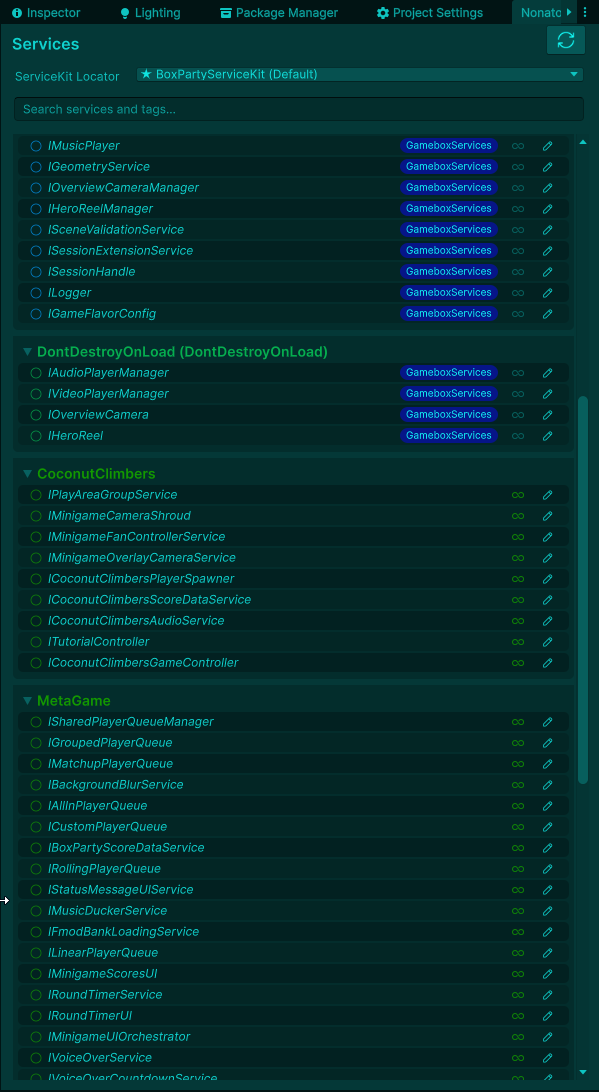
Features:
- Real-time Service Monitoring: View all registered services across all ServiceKit locators.
- Readiness Status: See at a glance whether a service is just registered or fully ready.
- Scene-based Grouping: Services organized by the scene that registered them, with DontDestroyOnLoad services shown separately.
- Tag Visualization: Service tags displayed inline for quick identification.
- Search & Filtering: Find services quickly by name or tag.
- Script Navigation: Click to open service implementation files.
- GameObject Pinging: Click MonoBehaviour services to highlight them in the scene.
API Reference
IServiceKitLocator Interface
// Fluent Registration (recommended)
IServiceRegistrationBuilder Register<T>(T service) where T : class;
IServiceRegistrationBuilder Register(object service);

// Direct Registration
void RegisterService<T>(T service) where T : class;
void RegisterService(Type serviceType, object service);
void RegisterAndReadyService<T>(T service) where T : class;
void ReadyService<T>() where T : class;
void UnregisterService<T>() where T : class;

// Synchronous Access
T GetService<T>() where T : class;
bool TryGetService<T>(out T service) where T : class;

// Atomic 3-State Resolution
ServiceResolutionStatus TryResolveService(Type serviceType, out object service);
// Returns Ready, RegisteredNotReady, or NotRegistered — single lock, no race conditions

// Asynchronous Access (automatically uses UniTask when available)
Task<T> GetServiceAsync<T>(CancellationToken cancellationToken = default) where T : class;
// Returns UniTask<T> when UniTask package is installed

// Dependency Injection
IServiceInjectionBuilder Inject(object target);

// Tag Queries
IReadOnlyList<ServiceInfo> GetServicesWithTag(string tag);
IReadOnlyList<ServiceInfo> GetServicesWithAnyTag(params string[] tags);
IReadOnlyList<ServiceInfo> GetServicesWithAllTags(params string[] tags);

// Management
IReadOnlyList<ServiceInfo> GetAllServices();
IServiceRegistrationBuilder Interface
IServiceRegistrationBuilder As<T>() where T : class;       // Register as interface type
IServiceRegistrationBuilder As(Type serviceType);           // Register as runtime type
IServiceRegistrationBuilder WithTags(params string[] tags); // Add tags
IServiceRegistrationBuilder WithTags(params ServiceTag[] tags);
IServiceRegistrationBuilder WithCircularExemption();        // Exempt from circular dependency check
void Register();  // Complete registration (not ready yet)
void Ready();     // Complete registration and mark as ready
IServiceInjectionBuilder Interface
IServiceInjectionBuilder WithCancellation(CancellationToken cancellationToken);
IServiceInjectionBuilder WithTimeout(float timeoutSeconds);
IServiceInjectionBuilder WithErrorHandling(Action<Exception> errorHandler);
void Execute(); // Fire-and-forget
Task ExecuteAsync(); // Awaitable (UniTask when available)
Best Practices
Service Design
- Use interfaces for service contracts to maintain loose coupling.
- Keep services stateless when possible for better testability.
- Prefer composition over inheritance for complex service dependencies.
Registration Strategy
- Register early in the application lifecycle.
ServiceKitBehaviourautomates this inAwake. - Initialize wisely. Place dependency-related logic in
InitializeServiceorInitializeServiceAsyncwhen usingServiceKitBehaviour. - Global services should be registered in persistent scenes or DontDestroyOnLoad objects.
Dependency Management
- Mark dependencies as optional when they're not critical for functionality.
- Use timeouts for service resolution to avoid indefinite waits.
- Handle injection failures gracefully with proper error handling.
- Avoid circular dependency exemptions unless absolutely necessary and the lifecycle is fully understood.
- Use
TryResolveServicewhen you need to atomically distinguish ready, registered-not-ready, and absent services without race conditions.
Performance Optimization
- Install UniTask for automatic performance improvements in async operations.
- Use async initialization in
InitializeServiceAsync()for I/O operations to avoid blocking the main thread. - Batch service resolution when possible using
UniTask.WhenAll()orTask.WhenAll(). - Profile on target platforms - UniTask benefits are most noticeable on mobile and lower-end devices.
Benchmark Performance
All core service operations complete in sub-millisecond time. These numbers were measured in the Unity Editor (development build) and will be faster in release builds.
Service Resolution
| Operation | Average Time | Throughput |
|---|---|---|
| TryGetService | 0.004ms | 245,700 ops/sec |
| IsServiceRegistered | 0.005ms | 220,614 ops/sec |
| IsServiceReady | 0.007ms | 147,477 ops/sec |
| GetService (sync) | 0.010ms | 103,000 ops/sec |
| GetServiceAsync | 0.018ms | 54,789 ops/sec |
| GetServicesWithTag | 0.026ms | 38,493 ops/sec |
Service Registration
| Operation | Average Time | Throughput |
|---|---|---|
| RegisterService | 0.594ms | 1,686 ops/sec |
| RegisterAndReadyService | 1.196ms | 837 ops/sec |
| Complete lifecycle (register + inject + ready) | 1.722ms | 581 ops/sec |
| Register 10 services | 17.152ms | 58 ops/sec |
| Register 50 services | 91.096ms | 11 ops/sec |
Stress Tests
| Operation | Average Time |
|---|---|
| 1000x sync resolution | 2.763ms |
| 100x async resolution | 16.413ms |
| 50 concurrent accessors x 20 services | 36.818ms |
| 1000x register/unregister cycle | 1867.780ms |
All core operations are well within frame budget for 60fps+ applications. Results will vary by hardware — run the included benchmark suite via Window > General > Test Runner to validate on your setup.
Performance Tips
// Fastest: TryGetService for hot-path access
if (serviceKit.TryGetService<IPlayerService>(out var service))
{
    service.Update();
}

// Prefer sync GetService when you know the service is ready
var player = serviceKit.GetService<IPlayerService>();

// Use async only when the service may not be ready yet
var player = await serviceKit.GetServiceAsync<IPlayerService>();

// Install UniTask for zero-allocation async and better Unity thread integration
Migration Guide
Migrating from v1.x to v2.0
V2.0 is a major release that replaces the generic ServiceKitBehaviour<T> pattern with attribute-based registration, adds a fluent API, and introduces one-liner dependency injection.
1. Replace ServiceKitBehaviour<T> with ServiceKitBehaviour + [Service]
Before:
public class AudioManager : ServiceKitBehaviour<IAudioService>, IAudioService
{
    [InjectService] private IConfigService _config;
    public void PlaySound(string id) { /* ... */ }
}
After:
[Service(typeof(IAudioService))]
public class AudioManager : ServiceKitBehaviour, IAudioService
{
    [InjectService] private IConfigService _config;
    public void PlaySound(string id) { /* ... */ }
}
For abstract base classes with multiple generic parameters, remove only the ServiceKit type parameter:
// Before: two generics — TService was just for ServiceKit
public abstract class ScoreService<TService, TScore> : ServiceKitBehaviour<TService>
    where TService : class
    where TScore : struct

// After: keep the functional generic, drop the ServiceKit one
public abstract class ScoreService<TScore> : ServiceKitBehaviour
    where TScore : struct

// Concrete class adds [Service]
[Service(typeof(IMyScoreService))]
public class MyScoreService : ScoreService<int>, IMyScoreService { }
2. Simplify Dependency Injection Calls
Before:
await _serviceKitLocator.InjectServicesAsync(this)
    .WithErrorHandling()
    .WithTimeout()
    .ExecuteWithCancellationAsync(destroyCancellationToken);
After (one-liner):
await _serviceKitLocator.InjectAsync(this, destroyCancellationToken);
The builder is still available for custom configuration:
await _serviceKitLocator.Inject(this)
    .WithTimeout(10f)
    .WithErrorHandling(ex => HandleMyError(ex))
    .ExecuteWithCancellationAsync(destroyCancellationToken);
3. Use Fluent Registration API
Before:
_serviceKit.RegisterService<IAudioService>(audioService);
_serviceKit.ReadyService<IAudioService>();
After:
_serviceKit.Register(audioService).As<IAudioService>().Ready();
Quick Migration Checklist
- Find-and-replace
: ServiceKitBehaviour<— remove the generic, keep the base class - Add
[Service(typeof(T))]attribute above each concrete class with the interface type - Find-and-replace
.InjectServicesAsync(with.InjectAsync(for one-liner calls, or.Inject(for builder calls - Replace
RegisterService<T>()/ReadyService<T>()pairs with.Register().As<T>().Ready() - Ensure each class still implements its declared interface
What You Gain
- Cleaner declarations — No generic type parameter noise in class signatures or inheritance chains
- Multi-type registration —
[Service(typeof(IFoo), typeof(IBar))]on a single class - One-liner injection —
InjectAsync(this, token)replaces 4-line builder chains - Fluent registration — Chainable API with tags, circular exemption, and deferred readiness
- Compile-time safety — Roslyn analyzer SK003 catches
[Service]type mismatches; SK005 catches missingbase.Awake()calls
Unit Testing
ServiceKit provides first-class support for unit testing through the UseLocator() method, which allows you to inject mock or test instances of IServiceKitLocator without requiring Unity's serialized field assignment.
Important: When using AddComponent<T>() to create a ServiceKitBehaviour, Unity calls Awake() immediately—before you can assign a locator. UseLocator() handles this automatically by triggering registration if it was skipped during Awake().
Testing with Mocks
Use NSubstitute or any mocking framework to create isolated unit tests:
[TestFixture]
public class MyServiceTests
{
    private IServiceKitLocator _mockLocator;
    private IServiceInjectionBuilder _mockBuilder;

    [SetUp]
    public void Setup()
    {
        _mockLocator = Substitute.For<IServiceKitLocator>();
        _mockBuilder = Substitute.For<IServiceInjectionBuilder>();

        // Setup fluent API chain
        _mockBuilder.WithCancellation(Arg.Any<CancellationToken>()).Returns(_mockBuilder);
        _mockBuilder.WithTimeout(Arg.Any<float>()).Returns(_mockBuilder);
        _mockBuilder.WithTimeout().Returns(_mockBuilder);
        _mockBuilder.WithErrorHandling(Arg.Any<Action<Exception>>()).Returns(_mockBuilder);
        _mockBuilder.ExecuteAsync().Returns(Task.CompletedTask);
        _mockLocator.Inject(Arg.Any<object>()).Returns(_mockBuilder);
    }

    [Test]
    public async Task MyBehaviour_RegistersService_OnAwake()
    {
        // Arrange
        var go = new GameObject();
        var behaviour = go.AddComponent<MyServiceKitBehaviour>();
        behaviour.UseLocator(_mockLocator);

        // Act
        await behaviour.TestAwake(CancellationToken.None);

        // Assert - ServiceKitBehaviour uses non-generic RegisterService
        _mockLocator.Received(1).RegisterService(typeof(IMyService), Arg.Any<object>(), Arg.Any<string>());
    }
}
Testing with Real ServiceKitLocator
For integration tests, use a real ServiceKitLocator instance:
[TestFixture]
public class MyServiceIntegrationTests
{
    private ServiceKitLocator _locator;

    [SetUp]
    public void Setup()
    {
        _locator = ScriptableObject.CreateInstance<ServiceKitLocator>();
    }

    [TearDown]
    public void TearDown()
    {
        _locator?.ClearServices();
        if (_locator != null) Object.DestroyImmediate(_locator);
    }

    [Test]
    public void MyBehaviour_RegistersAutomatically_WhenUseLocatorCalled()
    {
        // Arrange - AddComponent triggers Awake, but registration is skipped (no locator yet)
        var go = new GameObject();
        var behaviour = go.AddComponent<MyServiceKitBehaviour>();

        // Act - UseLocator triggers registration automatically
        behaviour.UseLocator(_locator);

        // Assert - Service is now registered
        Assert.IsTrue(_locator.IsServiceRegistered<IMyService>());
    }

    [Test]
    public async Task MyBehaviour_InjectsDependencies_WhenServicesReady()
    {
        // Arrange
        var playerService = new PlayerService();
        _locator.RegisterAndReadyService<IPlayerService>(playerService);

        var go = new GameObject();
        var behaviour = go.AddComponent<MyServiceKitBehaviour>();
        behaviour.UseLocator(_locator);

        // Act - Complete injection manually
        await _locator.Inject(behaviour)
            .WithCancellation(CancellationToken.None)
            .WithTimeout()
            .ExecuteAsync();

        _locator.ReadyService<IMyService>();

        // Assert
        Assert.IsNotNull(behaviour.PlayerService);
        Assert.AreSame(playerService, behaviour.PlayerService);
    }
}
Creating Testable ServiceKitBehaviours
Expose a TestAwake method to manually trigger the initialization sequence in tests:
[Service(typeof(IMyService))]
public class MyServiceKitBehaviour : ServiceKitBehaviour, IMyService
{
    [InjectService] private IPlayerService _playerService;

    public IPlayerService PlayerService => _playerService;

    public async Task TestAwake(CancellationToken cancellationToken)
    {
        RegisterServiceWithLocator();

        await Locator.Inject(this)
            .WithCancellation(cancellationToken)
            .WithTimeout()
            .WithErrorHandling(HandleDependencyInjectionFailure)
            .ExecuteAsync();

        await InitializeServiceAsync();
        InitializeService();

        MarkServiceAsReady();
    }
}
Contributing
We welcome contributions! Please see our Contributing Guidelines for details.
License
This project is licensed under the MIT License - see the LICENSE file for details.
Built with ❤️ for the Unity community
Comments
No comments yet. Be the first!
Sign in to join the conversation
Sign In