ScriptedImporter PrefabOrder

Demonstrates a bug in Unity's Scripted Importers where child object hierarchy order is not preserved when instantiating prefabs. Contains a reproducible test case showing how prefab children are reordered alphabetically instead of maintaining their original hierarchy order, which can cause rendering issues in UI-heavy scenes. Useful for understanding and reporting this importer limitation.
Unity Project
Built with Unity 2019.2.8f1 · download the source from GitHub

README
ScriptedImporter_PrefabOrder
Prefab Order Bug with Unity Scripted Importers
This project contains a simple Scripted Importer (MyScriptedImporter.cs) with these two game objects:
- An empty main game object (this is the parent)
- An instantiated prefab object (this is the child)
The referenced prefab, TestPrefab, itself has 3 child objects with the following order:
bbbBackPanelaaaFrontPanel_ThisShouldComeLast
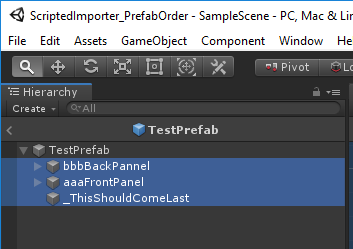
We would like this order of child objects to be preserved when we instantiate the TestPrefab and attach it to the main object through our scripted importer. However, the child objects are ordered alphabetically.
_ThisShouldComeLastaaaFrontPanelbbbBackPanel
Some Unity components, like UI elements, are rendered in the order they appear in the scene hierarchy so the re-ordered children can be the source of bugs.
To Reproduce
In order to reprodcue the bug you'll want to run the scripted importer and view the resulting asset in the scene.
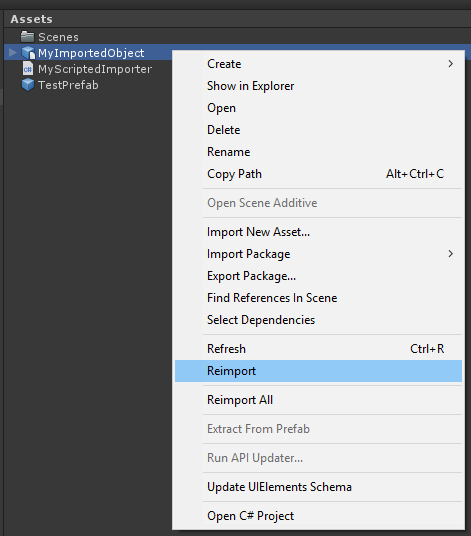
- Reimport
Assets/MyImportedObject. This uses the scripted importer that attaches a prefab instance. - Drag
Assets/MyImportedObjectin the scene hierarchy - Expand
MyImportedObjectin the scene hierarchy to see theTestPrefabchildren are out of order.
This depot is currently using Unity 2019.2.8f1. This behavior was first noticed with 2018.3.0f2.
Comments
No comments yet. Be the first!
Sign in to join the conversation
Sign In