

Customize your Unity Editor toolbar with buttons and toggles tailored to your workflow. Configure per-user preferences, extend functionality by adding simple attributed methods, and reorganize UI elements without touching code. Built entirely with UI Toolkit for seamless integration with modern Unity Editor versions.
Add to Unity Package Manager
Paste this URL into Unity's Window › Package Manager › + › Add package from git URL,
or click Install.
https://www.pkglnk.dev/redwyre-custom-toolbar.git README
Rendered from GitHubCustom toolbar

- Configuration per user in user preferences
- Easy to extend by writing functions with an attribute
- Fully customisable, you can add and remove buttons, and move them to different areas of the toolbar, and change the images of the buttons
- All UI Toolkit based
Toolbar
Preferences
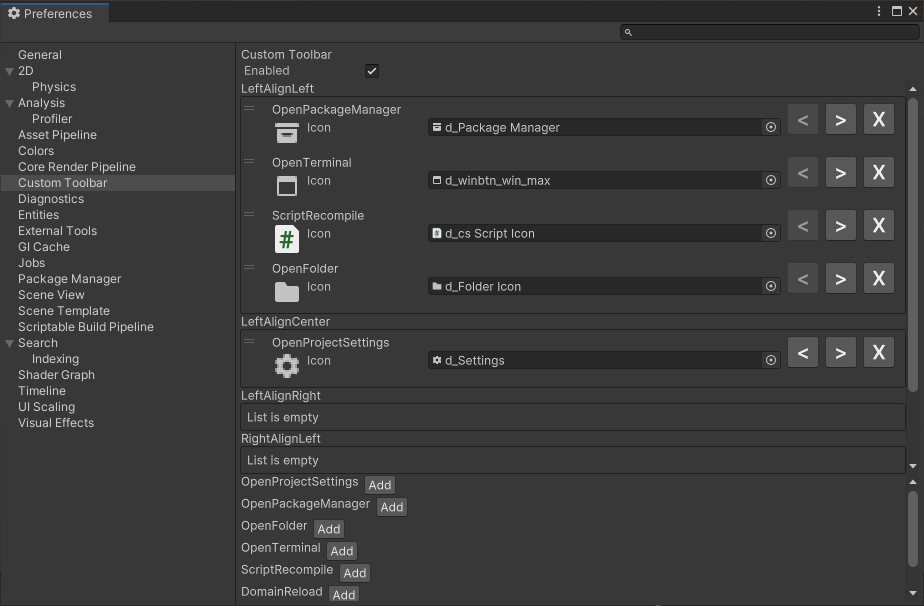
Installing
From GitHub
From the package manager window, click the + and select the option to use a git url, and paste in https://github.com/redwyre/com.redwyre.custom-toolbar.git
From OpenUPM
If you are already using OpenUPM you can merge this snippet with your project manifest:
{
    "scopedRegistries": [
        {
            "name": "package.openupm.com",
            "url": "https://package.openupm.com",
            "scopes": [
                "com.redwyre.custom-toolbar"
            ]
        }
    ],
    "dependencies": {
        "com.redwyre.custom-toolbar": "0.1.0"
    }
}
For more ways to install with OpenUPM see https://openupm.com/packages/com.redwyre.custom-toolbar/
Adding your own
Adding a button
To add a button to the toolbar, create a new static function in a class, and add the [ToolbarButton] attribute to it. The function should take no parameters and return void.
using Redwyre.CustomToolbar.Editor;

public static class BasicToolbarItems
{
    [ToolbarItem(Icon = "Settings", ToolTip = "Project Settings")]
    public static void OpenProjectSettings()
    {
        EditorApplication.ExecuteMenuItem("Edit/Project Settings...");
    }
}
Adding a toggle strip
To add a toggle strip to the toolbar, create a new static function in a class, and add the [ToolbarItem] attribute to it with the same number of icons as options. The function should take an int? parameter and return an int. The function is passed null when the toolbar wants to get the current value without changing it.
    [ToolbarItem(ToolTip = "Memory Leak Detection", Icons = new[] {"MemoryLeakDetection_0.png", "MemoryLeakDetection_1.png", "MemoryLeakDetection_2.png" })]
    public static int MemoryLeakDetection(int? newValue)
    {
        if (newValue.HasValue)
        {
            // Set the new value here
        }

        // Get and return the current value here
    }
Why
After having to manually force a domain reload multiple times I got the idea that it would be great to have a customisable toolbar that I could add it to while the rest of the team could have their own configurations that reflect their workflows.
There are a few existing projects that I want to acknowledge, each has some good ideas but individually didn't do what I wanted:
https://github.com/marijnz/unity-toolbar-extender The OG toolbar library, but using IMGUI, not configurable.
https://github.com/smkplus/CustomToolbar Configured in the project instead of user preference, outdated styles, can't add new functions.
https://github.com/BennyKok/unity-toolbar-buttons Good ideas with simple functions, but no customisability
Uses tertle's EditorToolbar.cs as a starting point https://gitlab.com/tertle/com.bovinelabs.core
So with a 4 day weekend I decided to have a go at working on it myself, and here we are.
Versions 0
No versions tracked yet.
Dependencies 0
No dependencies.
Changelog 0 releases
No changelog entries yet. Run the admin Changelog & Version Scanner to pull from the repository's CHANGELOG.md.
README Markdown
Copy this to your project's README.md

## Installation
Add **Custom Toolbar** to your Unity project via Package Manager:
1. Open **Window > Package Manager**
2. Click **+** > **Add package from git URL**
3. Enter:
```
https://www.pkglnk.dev/redwyre-custom-toolbar.git
```
[](https://www.pkglnk.dev/pkg/redwyre-custom-toolbar)Embed badge README snippet
[](https://www.pkglnk.dev/pkg/redwyre-custom-toolbar)<a href="https://www.pkglnk.dev/pkg/redwyre-custom-toolbar"><img src="https://www.pkglnk.dev/badge/redwyre-custom-toolbar.svg" alt="pkglnk installs"></a>https://www.pkglnk.dev/badge/redwyre-custom-toolbar.svgComments
No comments yet. Be the first!
Sign in to join the conversation
Sign In