Modular AI
Modular AI is an inspector based visual behaviour designer.
com.kitbashery.modular-ai Install via UPM
Add to Unity Package Manager using this URL
https://www.pkglnk.dev/modular-ai.git README Markdown
Copy this to your project's README.md

## Installation
Add **Modular AI** to your Unity project via Package Manager:
1. Open **Window > Package Manager**
2. Click **+** > **Add package from git URL**
3. Enter:
```
https://www.pkglnk.dev/modular-ai.git
```
[](https://www.pkglnk.dev/pkg/modular-ai)README







For a more performant, stable and fully featured solution check out our latest asset:

Modular-AI
Modular AI is an inspector based visual behaviour designer.
Features:
- Implements competing utility theory behaviours for dynamic AI behaviours.
- Zero string comparisons or calls to reflection.
- Behaviours can be fully configured during runtime.
- Not tied to a specific pathfinding solution.
- Fully extendable via code modules.
Built-in Modules:
Unity Pathfinding:
- Flee/Follow
- Wander
- Patrol
Memory:
- Remember players, AI agents, or environment objects.
- Focus/target objects in memory
- Invoke custom events.
Sensors:
- Eye-level scans
- Physics Scan Options for 2D & 3D
- Integrated with memory
Animation:
- Idle, Walk, Run & Jump
- Attack, Death Animations
- Dynamic Hit reactions
Getting Started:
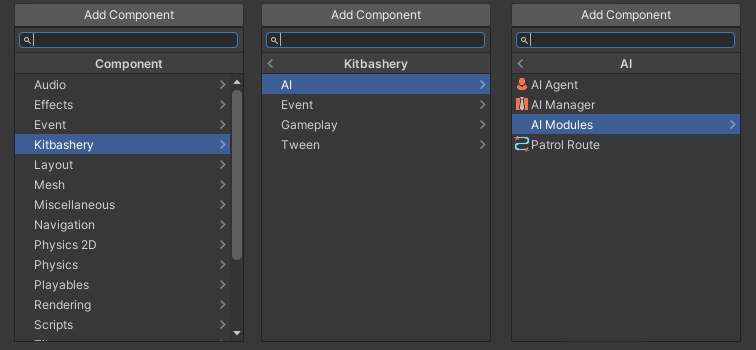
All components can be found under Kitbashery in the component menu:
Online documentation & scripting API is found at:
https://kitbashery.com/docs/modular-ai
Utility Theory:
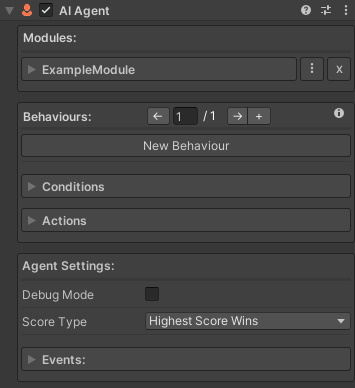
Modular AI uses utility theory for its AI behaviour logic. An AI agent can have as many behaviours as you want.
Note: Since v.2.0.2 Modular AI supports linear state-machine-like evaluation by default with optional competing utility theory behaviours.
Behaviours:
Behaviours are comprised of conditions and actions and have a score value. The behaviour with the score that best meets the score type you set will execute its actions.
Conditions:
Conditions are true/false statements based on what the AI knows about the game world. If a condition meets its desired state then it will add its score to the behaviour's total score.
Actions:
Actions are executed in the order they are arranged if a behaviour's total score meets the score type better than any other behaviour.
Module Scripting:
Take a look at the docs for ExampleModule.cs for how to create your own modules.
The name Kitbashery & all associated images Copyright © 2023 Kitbashery. All Rights Reserved.
No comments yet. Be the first!