Mixpanel
The official Mixpanel SDK for Unity enables developers to integrate analytics and user tracking directly into their games and applications. Track events, user properties, and behavioral data with simple API calls to gain insights into player engagement and optimize your game's performance. Supports Unity 2018.3 and above with straightforward initialization through project settings or manual code configuration.
com.mixpanel.unity 
Install via UPM
Add to Unity Package Manager using this URL
https://www.pkglnk.dev/mixpanel-unity.git README Markdown
Copy this to your project's README.md

## Installation
Add **Mixpanel** to your Unity project via Package Manager:
1. Open **Window > Package Manager**
2. Click **+** > **Add package from git URL**
3. Enter:
```
https://www.pkglnk.dev/mixpanel-unity.git
```
[](https://www.pkglnk.dev/pkg/mixpanel-unity)README
Table of Contents
Overview
Welcome to the official Mixpanel Unity SDK. The Mixpanel Unity SDK is an open-source project, and we'd love to see your contributions!
Check out our official documentation to learn how to make use of all the features we currently support!
Quick Start Guide
Supported Unity Version >= 2018.3. For older versions, you need to have .NET 4.x Equivalent selected as the scripting runtime version in your editor settings.
1. Install Mixpanel
This library can be installed using the unity package manager system with git. We support Unity 2018.3 and above. For older versions of Unity, you need to have .NET 4.x Equivalent selected as the scripting runtime version in your editor settings.
- In your unity project root open ./Packages/manifest.json
- Add the following line to the dependencies section "com.mixpanel.unity": "https://github.com/mixpanel/mixpanel-unity.git#master", or point to a specific version. Example: ("com.mixpanel.unity": "https://github.com/mixpanel/mixpanel-unity.git#v3.5.1")
- Open Unity and the package should download automatically Alternatively you can go to the releases page for versions before Release v3.0.0, download the .unitypackage file, and have Unity install that.
2. Initialize Mixpanel
You will need your project token for initializing your library. You can get your project token from project settings.
To initialize the library, first open the unity project settings menu for Mixpanel. (Edit -> Project Settings -> Mixpanel) Then, enter your project token into the Token and Debug Token input fields within the inspector. Please note if you prefer to initialize Mixpanel manually, you can select the Manual Initialization in the settings and call Mixpanel.Init() to initialize.
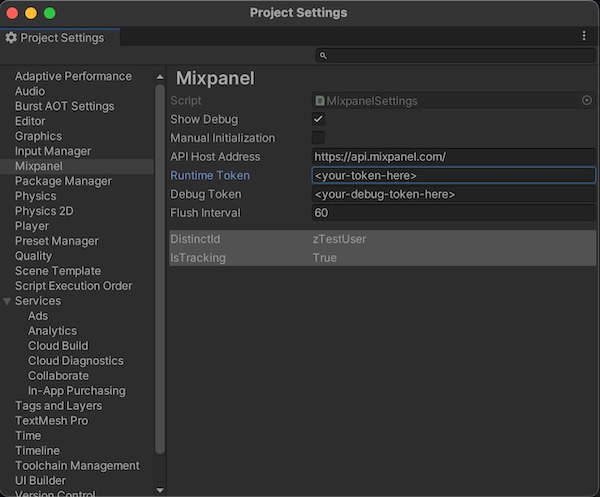
3. Send Data
Let's get started by sending event data. You can send an event from anywhere in your application. Better understand user behavior by storing details that are specific to the event (properties).
using  mixpanel;
// Track with event-name
Mixpanel.Track("Sent Message");
// Track with event-name and property
var  props  =  new  Value();
props["Plan"] =  "Premium";
Mixpanel.Track("Plan Selected", props);
4. Check for Success
Open up Events in Mixpanel to view incoming events. Once data hits our API, it generally takes ~60 seconds for it to be processed, stored, and queryable in your project.
👋 👋 Tell us about the Mixpanel developer experience! https://www.mixpanel.com/devnps 👍 👎
FAQ
Does the Unity SDK support Simplified ID Merge?
The Unity SDK does not currently support Simplified ID Merge. You will need to send data to a project using Original ID Merge to properly merge event streams before and after you call Mixpanel.Identify()
I want to stop tracking an event/event property in Mixpanel. Is that possible?
Yes, in Lexicon, you can intercept and drop incoming events or properties. Mixpanel won’t store any new data for the event or property you select to drop. See this article for more information.
I have a test user I would like to opt out of tracking. How do I do that?
Mixpanel’s client-side tracking library contains the OptOutTracking() method, which will set the user’s local opt-out state to “true” and will prevent data from being sent from a user’s device. More detailed instructions can be found in the section.
Starting with iOS 14.5, do I need to request the user’s permission through the AppTrackingTransparency framework to use Mixpanel?
No, Mixpanel does not use IDFA so it does not require user permission through the AppTrackingTransparency(ATT) framework.
If I use Mixpanel, how do I answer app privacy questions for the App Store?
Please refer to our Apple App Developer Privacy Guidance
I want to know more!
No worries, here are some links that you will find useful:

Have any questions? Reach out to Mixpanel Support to speak to someone smart, quickly.
Examples
Checkout our Examples by importing the Examples.unitypackage file located inside the Mixpanel folder after you follow the installation instructions above
Changelog
See changelog for details.
Want to Contribute?
The Mixpanel library for Unity is an open source project, and we'd love to see your contributions! We'd also love for you to come and work with us! Check out our open positions for details.
The best way to work on the Mixpanel library is the clone this repository and use a unity "local" package reference by creating a new unity project and opening the ./Packages/manifest.json file and adding the following line under the dependencies section
"com.mixpanel.unity": "file:C:/Path/to/cloned/repo/mixpanel-unity",
No comments yet. Be the first!