Linker Generator
Generate link.xml file for unity
com.kuraiandras.linkergenerator Install via UPM
Add to Unity Package Manager using this URL
https://www.pkglnk.dev/linkergenerator.git?path=Assets/LinkerGenerator README Markdown
Copy this to your project's README.md
Style
Preview 
## Installation
Add **Linker Generator** to your Unity project via Package Manager:
1. Open **Window > Package Manager**
2. Click **+** > **Add package from git URL**
3. Enter:
```
https://www.pkglnk.dev/linkergenerator.git?path=Assets%2FLinkerGenerator
```
[](https://www.pkglnk.dev/pkg/linkergenerator)README
LinkerGenerator 
An editor utility which will generate a link.xml file with the press of a button
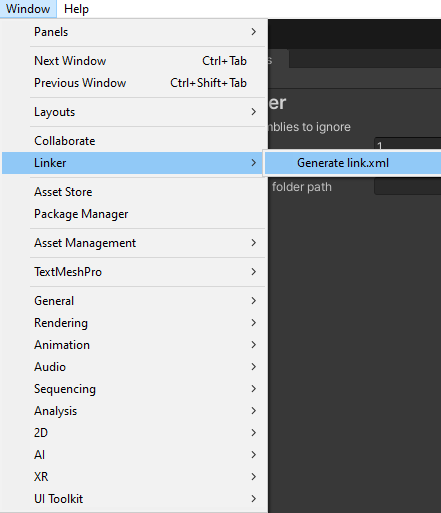
The plugin can find all added dlls and compiled scripting assemblies and generate a link.xml file which will preserve all of them.
.RSP files will also be scanned, and assemblies preceded by the "-r:" mark can be found.
You can customize the generation in the project settings
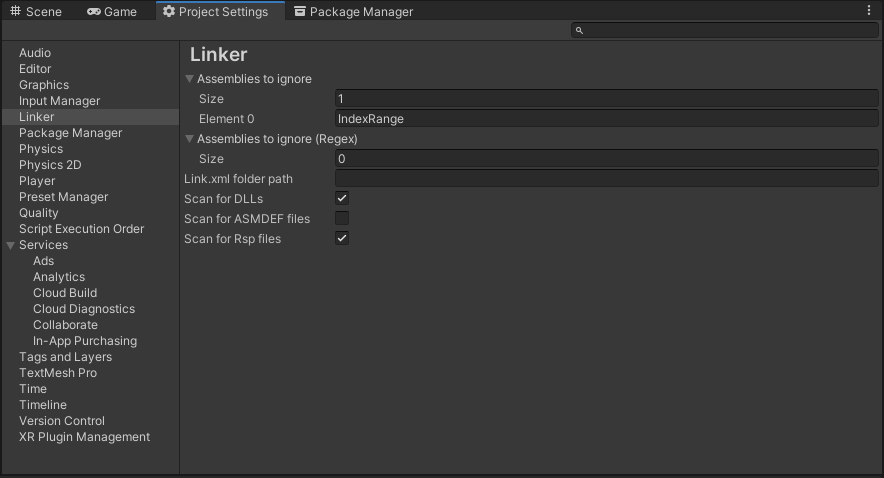
The settings are saved in the Assets folder, and should be checked in to source control.
Installation
The recommended way of installation is through open upm.
openupm add com.kuraiandras.linkergenerator
You also can manually install with UPM through git.
You can also install manually with a .unitypackage which can be found under releases
No comments yet. Be the first!