IToy
Native image processor for Unity that enables non-destructive editing directly within your project. Remove backgrounds, adjust colors, flip, and crop images with changes always based on the original file. Features brightness, contrast, hue, and saturation controls accessible through a simple right-click context menu.
com.rohanharikr.itoy 
Install via UPM
Add to Unity Package Manager using this URL
https://www.pkglnk.dev/itoy.git README Markdown
Copy this to your project's README.md
Style
Preview 
## Installation
Add **IToy** to your Unity project via Package Manager:
1. Open **Window > Package Manager**
2. Click **+** > **Add package from git URL**
3. Enter:
```
https://www.pkglnk.dev/itoy.git
```
[](https://www.pkglnk.dev/pkg/itoy)README
Your friendly neighbourhood non-additive image processor for Unity!
https://github.com/rohanharikr/IToy/assets/12775813/cb745359-13a3-4a3b-9c24-acd5a0e8fd0a
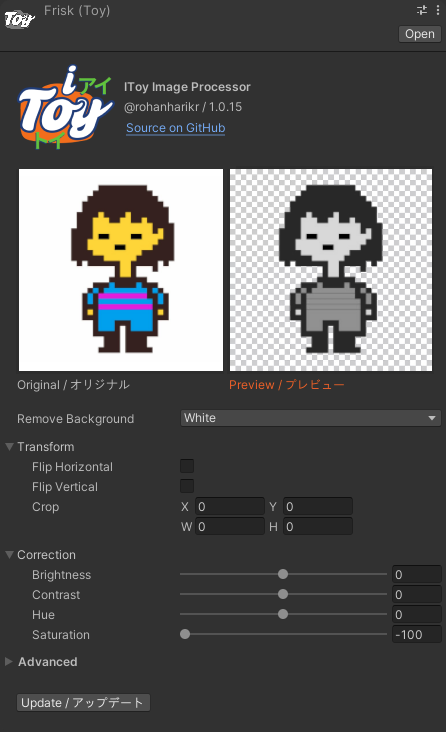
Features
- Remove background color
- Flip horizontal/vertical
- Crop (All sides)
- Color correction (Brightness, Contrast, Hue, Saturation)
- Non-additive (Changes are always based on the original image)
- Non-destructive (Revert to the original image anytime)
Installing
Package Manager (recommended)
- Open the package manager ("Window" > "Package Manager")
- Click on the plus icon and "Add package from git URL..."
- Enter https://github.com/rohanharikr/IToy.git and click "Add"
- Wait until the package manager finishes installing the package and recompiling
Importing Package
- Download the latest release
- Double-click the .unitypackage or import it
Manual
- Dowload this repository as a zip file, extract the archive
- In Unity, go in "Window" > "Package Manager" > "Add Package from disk"
- Select the "package.json" file located at the root of the package folder
Using
- Right-click any image from the Project Window > IToy > [Select any quick setting you want]
- Play with the toy file in the inspector
- Click on "Update" button to write changes to the image file
Thanks to Redditor zaraishu for help with the Japanese transliterations!
No comments yet. Be the first!