iOS ATT Localization
Provides localization of App Tracking Transparency (ATT) description
com.appegy.ios-att-localization 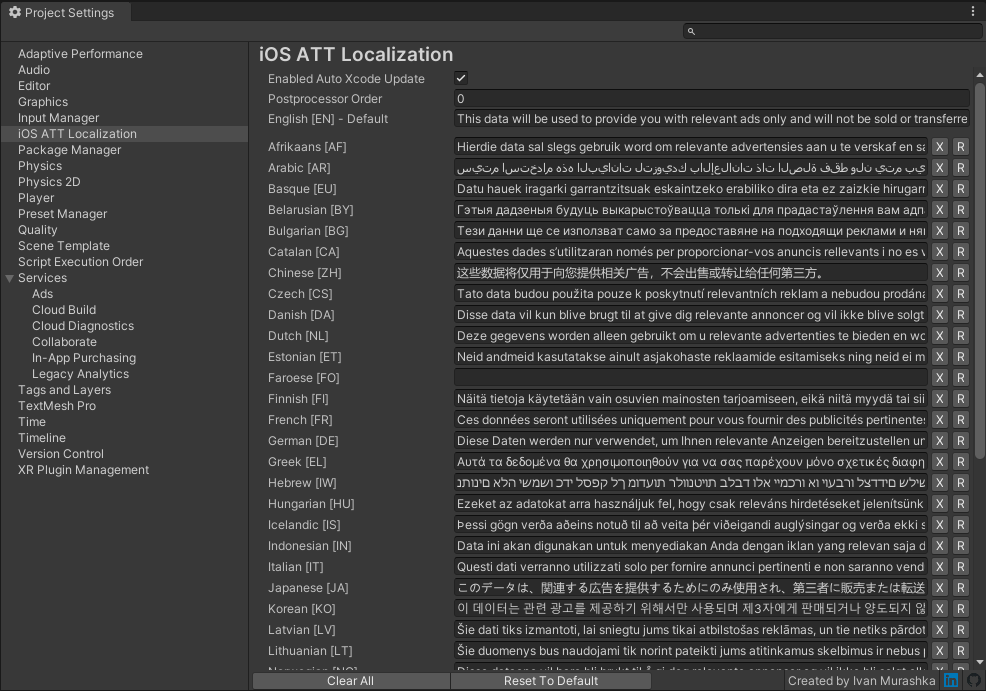
Install via UPM
Add to Unity Package Manager using this URL
https://www.pkglnk.dev/ios-att-localization.git README Markdown
Copy this to your project's README.md

## Installation
Add **iOS ATT Localization** to your Unity project via Package Manager:
1. Open **Window > Package Manager**
2. Click **+** > **Add package from git URL**
3. Enter:
```
https://www.pkglnk.dev/ios-att-localization.git
```
[](https://www.pkglnk.dev/pkg/ios-att-localization)README
📓 iOS App Tracking Transparency Localization for Unity

Description
Provides localization of iOS App Tracking Transparency (ATT) descriptions. Perfectly works with oficial Unity's iOS 14 Advertising Support package.
Installation
Manual add package to the manifest.json.
"dependencies": {
  "com.appegy.ios-att-localization": "https://github.com/appegy/ios-att-localization.git",
  ...
},
Or you can specify version you need
"dependencies": {
  "com.appegy.ios-att-localization": "https://github.com/appegy/ios-att-localization.git#1.0.0",
  ...
},
Or just use OpenUPM
openupm add com.appegy.ios-att-localization
Project Settings
The easiest way to add translations is just set them up in Project Settings.
Edit ➜ Project Settings ➜ iOS ATT Localization
Xcode project will be automatically updated after build if Enabled Auto Xcode Update is checked. You also must specify English [EN] - Default description. This description will be applied to NSUserTrackingUsageDescription property in main Info.plist. Now you are ready to set descriptions for any language you need (leave description empty if you want to use English [EN] - Default).
API
You also can set translation for any language by code. In your postprocessor script you can use next methods
public class YourPostProcessor : IPostprocessBuildWithReport
{
    public int callbackOrder => 0;

    public void OnPostprocessBuild(BuildReport report)
    {
        if (report.summary.platform == BuildTarget.iOS)
        {
            var buildPath = report.summary.outputPath;

            // Add AppTrackingTransparency.framework to generated xcode project
            TransparencyDescriptionsAPI.AddAppTrackingTransparencyFramework(buildPath);

            // Override NSUserTrackingUsageDescription in main Info.plist
            TransparencyDescriptionsAPI.SetAppTransparencyDefaultDescription(buildPath, "Default translation");

            // Set description for specific language
            TransparencyDescriptionsAPI.SetAppTransparencyDescription(buildPath, SystemLanguage.Belarusian, "Жыве Беларусь!");
        }
    }
}
No comments yet. Be the first!