Inspector Components
Draw component toggles on top of inspector and select one or many to isolate them
com.alexandros.inspectorcomponents 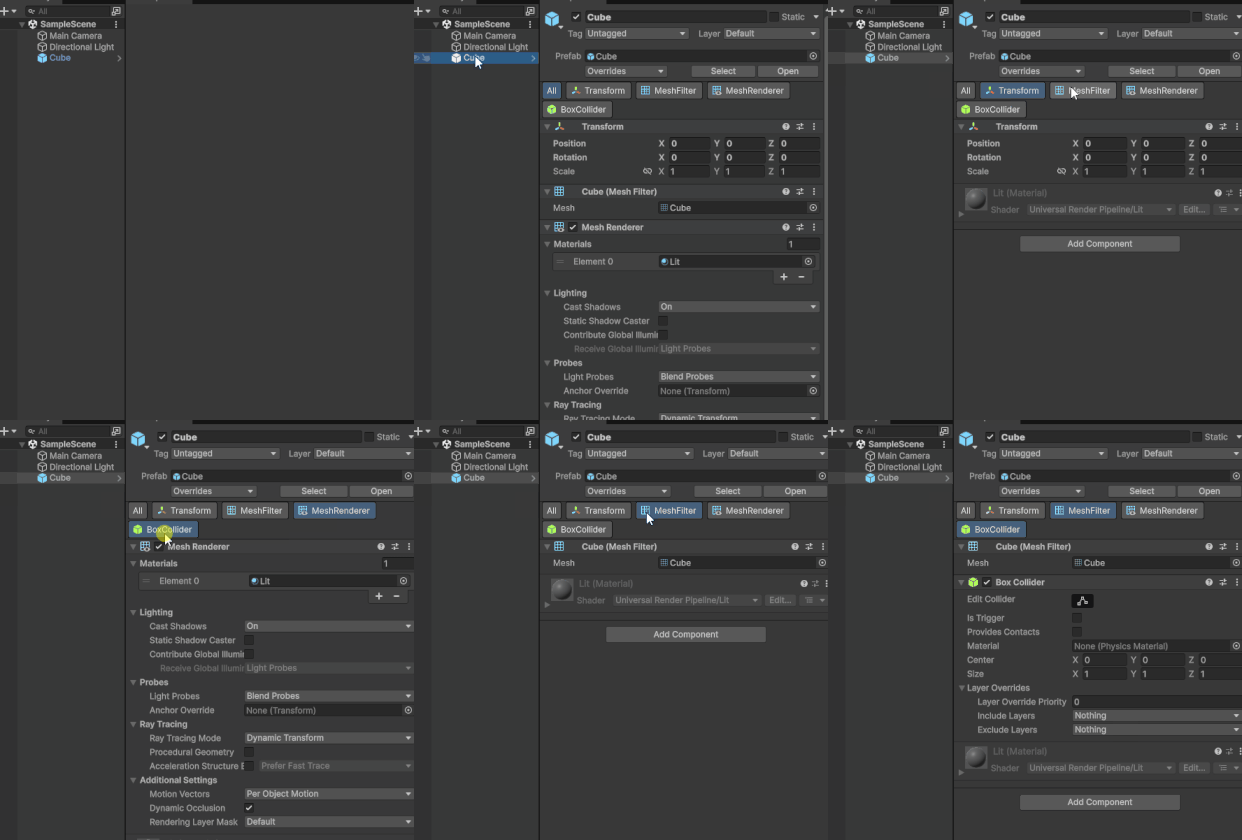
Install via UPM
Add to Unity Package Manager using this URL
https://www.pkglnk.dev/inspectorcomponents.git README Markdown
Copy this to your project's README.md
Style
Preview 
## Installation
Add **Inspector Components** to your Unity project via Package Manager:
1. Open **Window > Package Manager**
2. Click **+** > **Add package from git URL**
3. Enter:
```
https://www.pkglnk.dev/inspectorcomponents.git
```
[](https://www.pkglnk.dev/pkg/inspectorcomponents)README
Unity Inspector Components
A Unity package that draws all the components of a selected gameObject at the top of inspector.
Use the toggles to hide everything else and focus on one component.
Hold Ctrl or Cmd to isolate multiple components at once.
To toggle On/Off the added inspector elements go to Tools > Inspector Components > Enabled.
Inspired by the concept of component toggling seen in asset Wingman.
Tested on
- 6000.0.60f1
- 6000.3.10f1
Installation
Manifest
"com.alexandros.inspectorcomponents": "https://github.com/alexisstrat/unity-inspector-components.git"
PackageManager
Package Manager > + > Install from package from git URL.
https://github.com/alexisstrat/unity-inspector-components.git
License
This project is licensed under the MIT License - see the LICENSE file for details.
No comments yet. Be the first!