Import Overrides
A visual GUI for Textures similar to the default TextureImporter UI.
com.initialprefabs.importoverrides 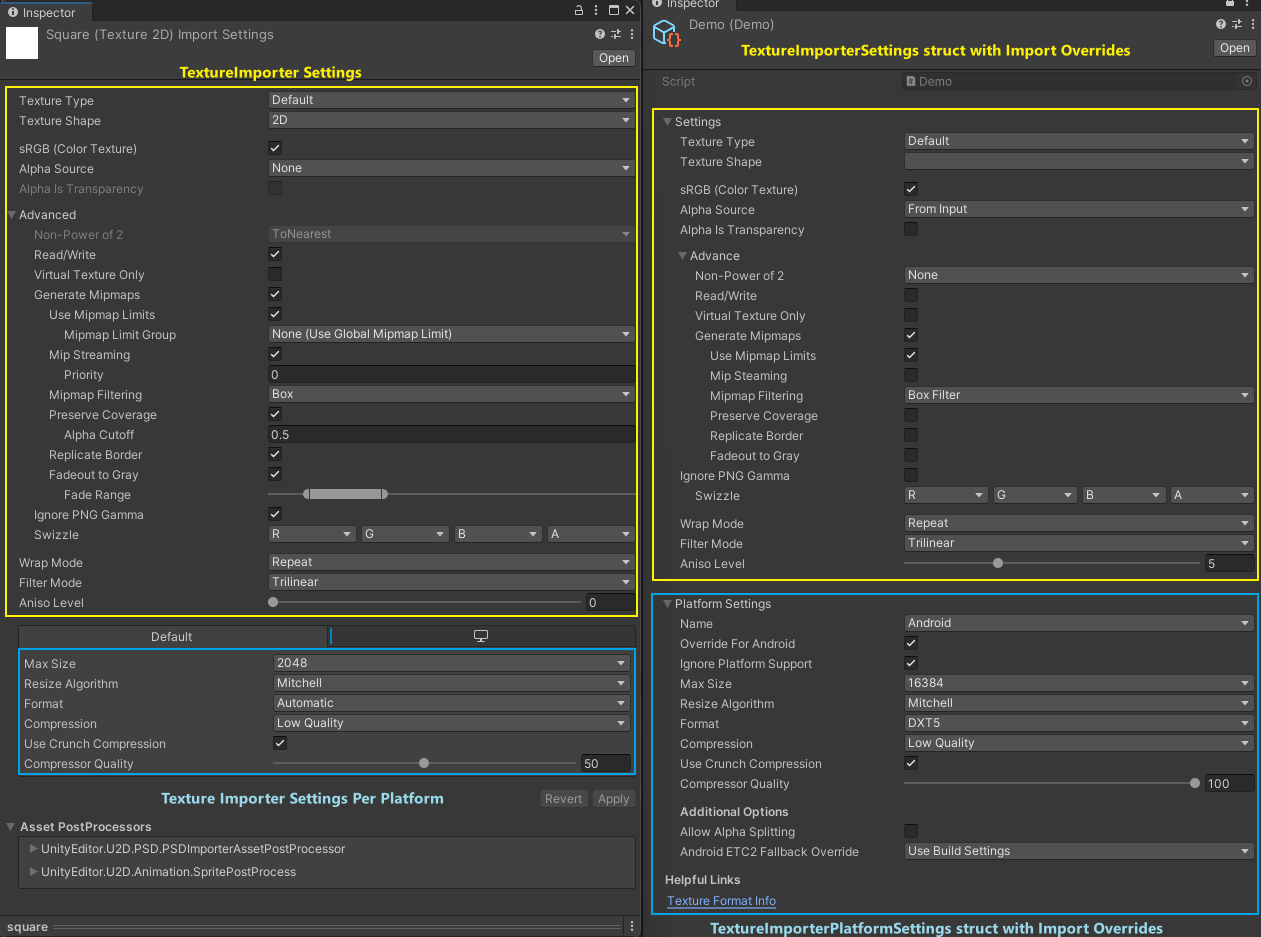
Install via UPM
Add to Unity Package Manager using this URL
https://www.pkglnk.dev/importoverrides.git?path=Assets/com.initialprefabs.importoverrides README Markdown
Copy this to your project's README.md

## Installation
Add **Import Overrides** to your Unity project via Package Manager:
1. Open **Window > Package Manager**
2. Click **+** > **Add package from git URL**
3. Enter:
```
https://www.pkglnk.dev/importoverrides.git?path=Assets%2Fcom.initialprefabs.importoverrides
```
[](https://www.pkglnk.dev/pkg/importoverrides)README
ImportOverrides
Unity's texture importer provide a list of default settings for manual editing. However, if you are trying to automate those importers, you need to go through
With those 2 structs, you would typically set them on the texture importer through an AssetImporter.
The issue
Setting up a scriptable import pipeline requires you know which settings to enable/disable. The struct just has a bunch of getter and setters and you'll need to know which settings to place. Without a visual GUI, this makes it cumbersome to visualize.
The solution
Provide a GUI similar to Unity's TextureImporter. This allows the TextureImporterSettings to
feel more familiar and allows developers to set up their pipeline visually. That is what this
repository aims to do.
On the left side of the screenshot is Unity's default TextureImporter. The right side of the screenshot
aims to replicate that same GUI but for the TextureImporterSettings and TextureImporterPlatformSettings
structs.
What this plugin does not do
It is still the developer's responsibility to set up their own Scriptable Import Pipeline. This
is not an architecture, it is only a GUI frontend to the TextureImporterSettings.
You can use this GUI frontend for all instances of serialized TextureImporterSettings.
Usage
Use TextureImporterSettings normally in your project. Any serialized TextureImporterSettings will be displayed with a custom
GUI in the inspector. When writing your custom importer, use the following APIs:
You can also use the TextureImporter's API to copy to the structs first if you want to use some of Unity's default per import session.
Limitations
Mipmap Limit Groups are not embedded in TextureImporterSettings, so the GUI does not display an override for that. Your
Scriptable Import Pipeline should handle it.
Reference Video
https://github.com/user-attachments/assets/4beae39d-5f3d-450e-85bd-25ef40803f25
In the demo folder, you can see a Scriptable Object called Demo.
- The Demo Scriptable Object only has the
TextureImporterSettingsvariable. Instead of showing the default struct, it shows a GUI similar to theTextureImporter.
Install
You have a couple of options to install this package.
- Use OpenUPM
- Add this package's git url through the package manager
- In the toolbar go to Window
- Select Package Manager
- Click the
+sign in the top left corner
- Click the
- Select
Add package from git URL...
- Select
- Download the zip and extract
com.initialprefabs.importoverridesinto your project manually.
No comments yet. Be the first!