Unity Editor History Panel
Photoshop Like History panel with shortcut navigation
com.brunomikoski.editorhistorypanel 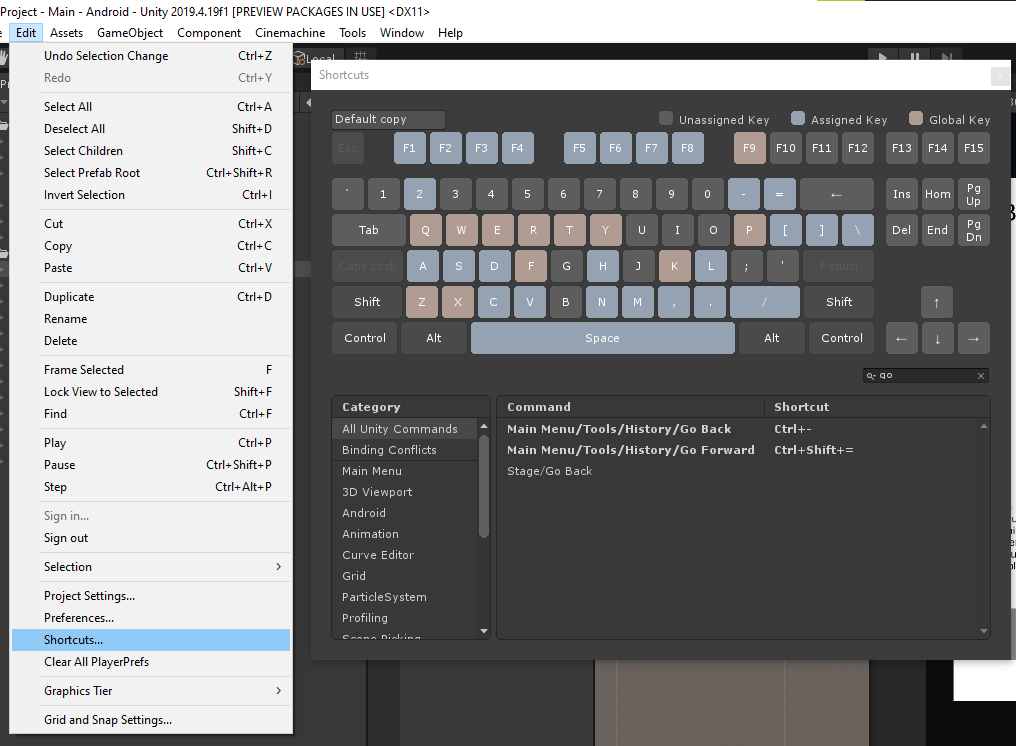
Install via UPM
Add to Unity Package Manager using this URL
https://www.pkglnk.dev/editorhistorypanel.git README Markdown
Copy this to your project's README.md
Style
Preview 
## Installation
Add **Unity Editor History Panel** to your Unity project via Package Manager:
1. Open **Window > Package Manager**
2. Click **+** > **Add package from git URL**
3. Enter:
```
https://www.pkglnk.dev/editorhistorypanel.git
```
[](https://www.pkglnk.dev/pkg/editorhistorypanel)README
Unity Editor History panel






Features
- Don't need to be focuses to get shortcuts, just open and keep with something, like inspector
- Keep history between Editor / Playtime
How to use
- Just open by
Tools/History/Open History - I recommend setting up shortcuts between
Go BackandGo Forwardusing the Unity Shortcut Menu:
System Requirements
Unity 2018.4.0 or later versions
How to install
Add from OpenUPM | via scoped registry, recommended
This package is available on OpenUPM: https://openupm.com/packages/com.brunomikoski.editorhistorypanel
To add it the package to your project:
- open
Edit/Project Settings/Package Manager - add a new Scoped Registry:
Name: OpenUPM URL: https://package.openupm.com/ Scope(s): com.brunomikoski - click Save
- open Package Manager
- click +
- select Add from Git URL
- paste
com.brunomikoski.editorhistorypanel - click Add
Add from GitHub | not recommended, no updates :(
You can also add it directly from GitHub on Unity 2019.4+. Note that you won't be able to receive updates through Package Manager this way, you'll have to update manually.
- open Package Manager
- click +
- select Add from Git URL
- paste
https://github.com/brunomikoski/Animation-Sequencer.git - click Add
Comments
No comments yet. Be the first!
Sign in to join the conversation
Sign In