Editor History
Navigate your selection history efficiently with back and forward mouse buttons or a dedicated toolbar window. Editor History streamlines your workflow by letting you quickly jump between previously selected objects, assets, and scenes. Customize shortcuts through Unity's Shortcut manager, and dock the history window permanently or use it as a quick-access modal.
com.bedtime.editor-history 
Install via UPM
Add to Unity Package Manager using this URL
https://www.pkglnk.dev/editor-history.git README Markdown
Copy this to your project's README.md

## Installation
Add **Editor History** to your Unity project via Package Manager:
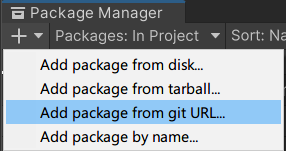
1. Open **Window > Package Manager**
2. Click **+** > **Add package from git URL**
3. Enter:
```
https://www.pkglnk.dev/editor-history.git
```
[](https://www.pkglnk.dev/pkg/editor-history)README
Editor History

A small tool with a huge workflow impact! With Editor History installed you can navigate back and forth through your selection history with the back/forward buttons on your mouse! The selection history can also be navigated through its own window by clicking the Editor History button in the Unity toolbar.
By default this window acts as a modal that will close if you click away from it, but in the top right corner of the window you can pop it out into a seperate window that can be docked anywhere, should you want to keep it open permanently.
Getting started
Simply install the package, and now by default, your Back/Forward mouse buttons will navigate back and forth through your history. The shortcuts can be changed to any other key from Unity's Shortcut manager. Unity has no support for mouse shortcuts prior to version 2022.2! Instead the package will fall back to hardcoded Mouse4/5 button polling directly from the WIN32 API. (This also means that there is no mouse support at all for MacOS Unity versions prior to 2022.2)
Git + Unity Package Manager
Add this URL to your Unity Package manager as a git package
https://github.com/BedtimeDigitalGames/Unity-Editor-History.git#1.4.1
OpenUPM
$ openupm add com.bedtime.editor-history
UnityPackage
How to use
- Click back and forwards on your mouse to navigate through your selection history
- Alternatively click the Editor History button (clock icon) in the top Unity toolbar to open a list of your selection history
No comments yet. Be the first!