Build Pipeline for Android
>-
com.luvikung.buildpipelineandroid 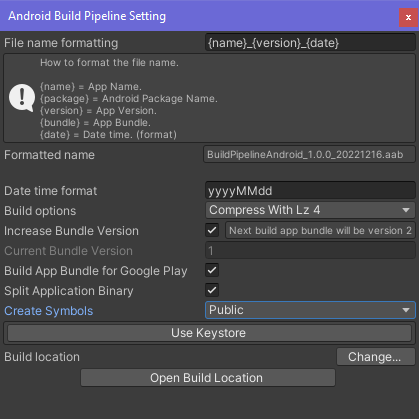
Install via UPM
Add to Unity Package Manager using this URL
https://www.pkglnk.dev/buildpipelineandroid.git#upm README Markdown
Copy this to your project's README.md

## Installation
Add **Build Pipeline for Android** to your Unity project via Package Manager:
1. Open **Window > Package Manager**
2. Click **+** > **Add package from git URL**
3. Enter:
```
https://www.pkglnk.dev/buildpipelineandroid.git#upm
```
[](https://www.pkglnk.dev/pkg/buildpipelineandroid)README
Build Pipeline for Android
This is a build tools for Unity Editor that easier to use. Include custom format name and auto increment bundle every perform a build. Created by Thanut Panichyotai (@LuviKunG)
How to use?
New menu will be add to your Unity Editor named 'Build'. In the menu that will include two elements.
- Android will perform a build. If you're not select the directory before, it will popup the directory selection window and start perform a build.
- Settings/Android will open the build pipeline settings for android.
In the settings, you can set a format name, date format and other options for build. (It's already include descriptions)
How to install?
UPM Install via manifest.json
Locate to your Unity Project. In Packages folder, you will see a file named manifest.json. Open it with your text editor (such as Notepad++ or Visual Studio Code or Legacy Notepad)
Then merge this json format below.
(Do not just copy & paste the whole json! If you are not capable to merge json, please using online JSON merge tools like this)
{
  "dependencies": {
    "com.luvikung.buildpipelineandroid": "https://github.com/LuviKunG/BuildPipelineAndroid.git#1.0.7"
  }
}
If you want to install the older version, please take a look at release tag in this git, then change the path after # to the version tag that you want. Or checkout CHANGELOG.md for more imformation.
No comments yet. Be the first!