Unity Piper G2p Inference Runtime

Realtime on-device TTS using Unity Inference Engine with mini-bart-g2p and Piper
Unity Project
Built with Unity 6000.2.0b2 · download the source from GitHub
README
unity-piper-g2p-inference-runtime
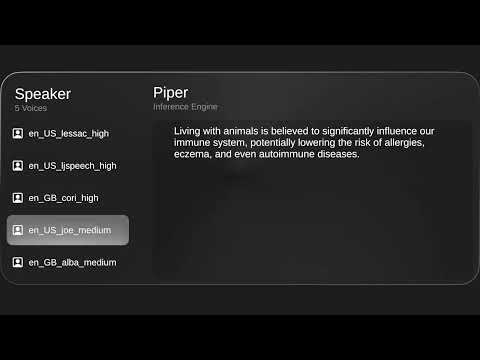
🎙️ Project Overview
This project demonstrates a REALTIME, fully ON-DEVICE, and LIGHTWEIGHT Text-to-Speech (TTS) system implemented in Unity.
Powered by the Unity Inference Engine and optimized through asynchronous processing, both grapheme-to-phoneme (G2P) conversion and speech synthesis run locally—without requiring any external APIs or internet connection.
Each model is highly compact:
- Low / Medium quality voices are around 60MB,
- High-quality voices remain under 108MB,
making this solution ideal for mobile and embedded applications.
By integrating the Piper TTS engine, the system supports multiple voices and languages, delivering smooth and responsive audio generation even on mid-range hardware—completely offline.
🚀 Usage
Clone the repository:
git clone https://github.com/pnltoen/unity-piper-g2p-inference-runtime.git
cd unity-piper-g2p-inference-runtimeDownload
StreamingAssets.zipand extract it into theAssets/folder.
Make sure the full path becomes:Assets/StreamingAssets/Open the Unity project and load the scene located at:
Assets/piper.unityDownload the VisionOS-style UI asset from the Unity Asset Store
In the Hierarchy, select the
piper_engineobject and adjust the Piper TTS scales:noise_scale(Default:0.4, Trained:0.667)length_scale(Default:1.1, Trained:1)noise_w(Default:0.6, Trained:0.8)
Press Play in the Editor and type the sentence you want to synthesize.
You can select different voices from the left panel.
For additional voices, refer to piper/VOICES.md
🔍 Limitations and Notes
mini-bart-g2poperates on a word-level basis, so context-sensitive pronunciations (e.g.,readin past vs. present tense, oruseas noun vs. verb) are not accurately distinguished.While Piper supports multilingual voices, this project uses
mini-bart-g2p, which only accepts English text as input. Non-English text will not be converted properly to phonemes.Each input sentence is processed one word per frame, where the G2P encoder-decoder runs per word.
After all words are processed, the phoneme sequence is passed asynchronously to the Piper model for real-time audio synthesis and playback.Although
mini-bart-g2pcan run on GPU, its auto-regressive structure requires downloading predicted tokens to the CPU at each step.
This frequent GPU-to-CPU transfer introduces overhead, making pure CPU execution faster and more efficient in this case.The Piper TTS model runs on the GPU to ensure smooth real-time speech synthesis.
The entire inference process—from phoneme input to audio playback—is handled asynchronously for low-latency performance.
You can fine-tune responsiveness by adjusting thek_LayersPerFramevariable, which controls how many decoder layers are processed per frame.
📚 Additional Resources
For more implementation details and practical usage of Unity Inference Engine with TTS and G2P, refer to the following (Korean blog posts):
- Implementing Piper TTS using Unity Inference Engine (Korean blog post)
- Exploring Grapheme-to-Phoneme (G2P) in Unity Inference Engine (Korean blog post)
- Preprocessing with Python Server in Unity Inference Engine (Korean blog post)
📄 License
This project (unity-piper-g2p-inference-runtime) is released under the Apache License 2.0.
However, it includes third-party machine learning models and phonemization tools that are governed by their own licenses:
▶️ Included Models and Licenses
- mini-bart-g2p (Cisco AI) – Apache License 2.0
- Piper TTS (Rhasspy) – MIT License
All external models used in this project are serialized and stored in Assets/StreamingAssets/.
Their original license texts are also included in that directory.
⚠️ Please review and comply with each license when redistributing or modifying any part of this project that includes third-party components.
Comments
No comments yet. Be the first!
Sign in to join the conversation
Sign In