Unio

Unio (short for unity native I/O) is a small utility set of I/O using native memory areas.
Unity Project
Built with Unity 2023.2.18f1 · download the source from GitHub
Dependencies (18)
README
Unio


Unio (short for unity native I/O) is a small utility set of I/O using native memory areas.
It provides a drop-in replacement of the System.IO.File.
| Feature | Description |
|---|---|
NativeFile.ReadAllBytes |
The NativeArray<byte> version of File.ReadAllBytes. |
NativeFile.ReadAllBytesAsync |
The NativeArray<byte> version of File.ReadAllBytesAsync. |
NativeFile.WriteAllBytes |
The NativeArray<byte> version of File.WriteAllBytes. |
NativeFile.WriteAllBytesAsync |
The NativeArray<byte> version of File.WriteAllBytesAsync |
In addition, Unio provides NativeArray extensions for interoperability with modern memory-consuming C# APIs.
| Feature | Description |
|---|---|
NativeArray<T>.AsMemory() |
Convert to Memory<T>. To easy to use as ReadOnlySequence<T>, |
NativeArrayBufferWriter<T> |
The NativeArray<T> version of ArrayBufferWriter<T> (IBufferWirter<T>). |
Motivation:
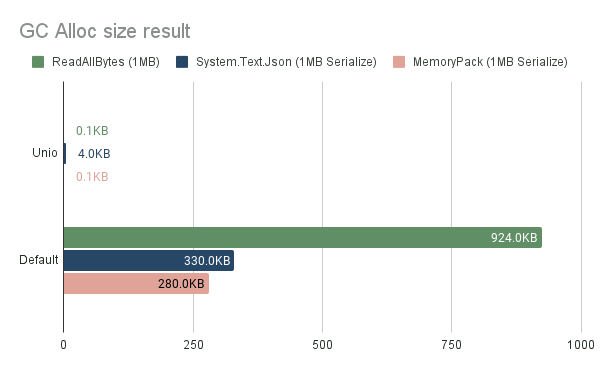
Overloading the Managed GC area in C# leads to a performance penalty for the game.
- The GC Collect phase stops all managed threads.
- The managed memory area is expanded, the application's maximum memory usage tends to increase.
Therefore, it is an important optimization to use the native allocator for memory that does not need to be handled by C#.
Unity has the ability to allocate native area memory directly, instead of using C#'s GC managed heap. https://docs.unity3d.com/Manual/JobSystemNativeContainer.html Usually it can load Assets such as Mesh, Texture, and Addressable into its native memory area, but Unio can be used to extend this use.
It is effective if data to be read/written dynamically can also be treated as Native Memory area.
One typical example is Serialization.
Modern serializers (such as System.Text.Json, MessagePack-CSharp, MemoryPack, VYaml, etc) can take ReadOnlySequence<byte> or IBufferWriter<byte> as input. Unio is designed to integrate with these.
We want to treat the deserialization result as C# memory, but the raw data before deserialization is not needed on the C# side.
[!NOTE] Why is a native allocator better than C#'s GC for allocating large temporary memory?
First, Unity's C# GC is based on Boehm GC. It does not have a compaction function during GC Collect. This means that memory, once allocated, is not relocated. Even if there are many small free spaces, they cannot be used for large memory allocations. Therefore, if large memory allocations and deallocations are repeated, large free spaces will be created repeatedly. It might not be a problem if large free spaces can be reused, but in reality, memory is prone to fragmentation due to the lack of contiguous free space.
Native allocators Temp and TempJob have an arena. Additionally, for the Persistent allocator, an algorithm that frees memory block by block is used. https://docs.unity3d.com/6000.1/Documentation/Manual/performance-native-allocators.html Also, since the amount of usage of various sizes is overwhelmingly smaller than C#, it is advantageous to use native for memory that is not needed as C# objects.
Table of Contents
Installation
You can use add git URL from Package Manager:
https://github.com/hadashiA/Unio.git?path=/Assets/Unio#0.2.0
Usage
Read file
NativeFile.ReadAllBytes / .ReadAllBytesAsync is used to read the file contents at once into Unity's Native memory area.
// Read file
// The return value is a NativeArray<byte>. Dispose when you have finished using it.
using var bytes = NativeFile.ReadAllBytes("/path/to/file");

// Read file with async
// The return value is a Awaitable<NativeArray<byte>>
using var bytes = await NativeFile.ReadAllBytesAsync("/path/to/file", cancellationToken: cancellationToken);
This is just an internal, AsyncReadManager. So it works on any platform.
By default, ReadAllBytesAsync performs a synchronous wait on the ThreadPool to optimize for latency.
If you want to change this behavior, you may supply a SynchonizationStrategy argument.
using var bytes = await NativeFile.ReadAllBytesAsync("/path/to/file", SynchonizationStrategy.PlayerLoop);
SynchonizationStrategy.BlockOnThreadPool(default)- Synchronous I/O on thread pools. Lowest latency.
SynchonizationStrategy.PlayerLoop- Check for completion every frame by Unity's PlayerLoop.
- It is suitable for environments where you want to wait on the main thread or where ThreadPool is not available, such as WebGL.
[!NOTE] If you are using Unity older than 2023.1, the async method will use
Task<T>, notAwaitalbe<T>.
In addition, a Unio extensions of NativeArray<byte>.AsMemory() can be used to work with modern C# APIs.
using var bytes = NativeFile.ReadAllBytes("/path/to/file");

// System.Text.Json
var deserializedData = JsonSerializer.Deserialize<MyData>(bytes.AsSpan());

// MessagePack-CSharp
var deserializedData = MessagePackSerializer.Deserialize<MyData>(bytes.AsMemory());

// VYaml
var deserializedData = YamlSerializer.Deserialize<MyData>(bytes.AsMemory());
[!WARNING] Note that
Memory<T>retrieved withNativeArray<T>.AsMemory()should not have a lifetime longer thanNativeArray<T>. When NativeArrayis disposed, the contents pointed to by Memory<T>are also destroyed.
Write file
// Write file
var bytes = NativeFile.WriteAllBytes("/path/to/file", nativeArray);

// Write file async (only for threadpool)
var bytes = await NativeFile.WriteAllBytesAsync("/path/to/file", nativeArray);
NativeArrayBufferWriter
Unio.NativeArrayBufferWriter<T> is a IBufferWriter
It functions as a variable length buffer using NativeArray.
It is useful to use IBufferWriter<T> as input to a library that accepts it.
using var bufferWriter = new NativeArrayBufferWriter<byte>(InitialBufferSize);

// System.Text.Json
var jsonWriter = new Utf8JsonWriter(arrayBufferWriter);
JsonSerializer.Serialize(jsonWriter, data);

// MemoryPack
using var state = MemoryPackWriterOptionalStatePool.Rent(MemoryPackSerializerOptions.Default);
var writer = new MemoryPackWriter<ArrayBufferWriter<byte>>(ref arrayBufferWriter, state);
MemoryPackSerializer.Serialize(ref writer, in data);

// VYaml
YamlSerializer.Serialize(bufferWriter, data);
The buffer can be obtained as a NativeArray<byte>. This can be written to a file using Unio.NativeFile.
var nativeArray = bufferWriter.WrittenBuffer;
NativeFile.WriteAllBytes("/path/to/file", nativeArray);
Unity Assets Integrations
The Unity engine provides an API that directly accepts NativeArray<byte>.
// Example of loading a yaml text from Addressable.
var textAsset = async Addressable.LoadAssetAsync<TextAsset>(assetPath);

// Unio provides a extension to get Memory<byte> from NativeArray<byte>
var bytes = textAsset.GetData<byte>().AsMemory();

YamlSerializer.Deserialize<MyData>(bytes);
// Example of loading a yaml text from url.
using var request = UnityWebRequest.Get(url);
while (!request.isDone)
{
    yield return req.SendWebRequest();
}

// Unio provides a extension to get Memory<byte> from NativeArray<byte>
var bytes = request.downloadHandler.nativeData.AsMemory();
YamlSerializer.Deserialize<MyData>(bytes.AsMemory());
// Texture2D, for example, has the ability to get/set with NativeArray<byte>.

var data = texture.GetRawTextureData<byte>();
NativeFile.WriteAllBytes("/path/to/file", data);

var savedData = NativeFile.ReadAllBytes("/path/to/file");
var texture2D = new Texture2D(w, h, format, mipChain); // Restore
texture2D.LoadRawTextureData(savedData);
texture2D.Apply();
LICENSE
MIT
Author
Comments
No comments yet. Be the first!
Sign in to join the conversation
Sign In