Utilities.Websockets

A simple websocket plugin for Unity (UPM)
Unity Project
Download the source from GitHub

README
com.utilities.websockets



A simple websocket package for the Unity Game Engine.
Installing
Requires Unity 2021.3 LTS or higher.
The recommended installation method is though the unity package manager and OpenUPM.
Via Unity Package Manager and OpenUPM
Terminal
openupm add com.utilities.websockets
Manual
- Open your Unity project settings
- Select the
Package Manager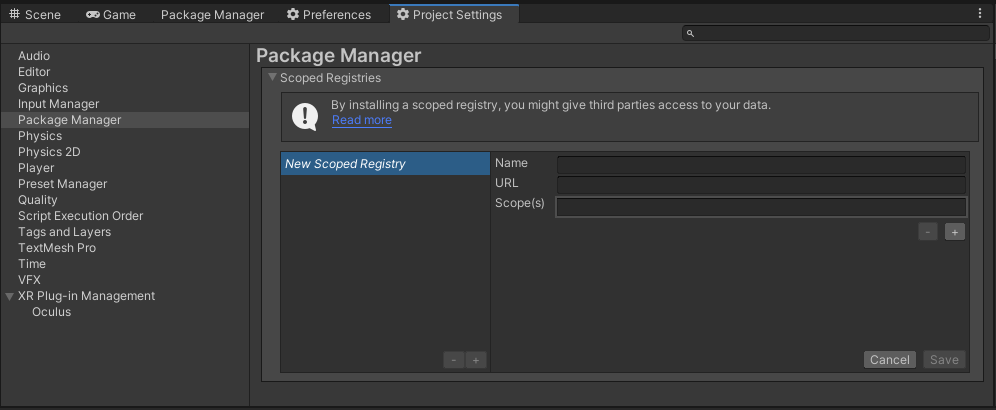
- Add the OpenUPM package registry:
- Name:
OpenUPM - URL:
https://package.openupm.com - Scope(s):
com.utilities
- Name:
- Open the Unity Package Manager window
- Change the Registry from Unity to
My Registries - Add the
Utilities.Websocketspackage
Via Unity Package Manager and Git url
[!WARNING] This repo has dependencies on other repositories! You are responsible for adding these on your own.
- Open your Unity Package Manager
- Add package from git url:
https://github.com/RageAgainstThePixel/com.utilities.websockets.git#upm
Documentation
Table Of Contents
Connect to a Server
To setup a new connection, create a new instance of WebSocket and subscribe to event callbacks, and call Connect or ConnectAsync methods.
[!IMPORTANT] WebSocket implements
IDisposableand should be properly disposed after use!
var address = "wss://echo.websocket.events";
using var socket = new WebSocket(address);
socket.OnOpen += () => Debug.Log($"Connection Established @ {address}");
socket.OnMessage += (dataFrame) => {
    switch (dataFrame.Type)
    {
        case OpCode.Text:
            AddLog($"<- Received: {dataFrame.Text}");
            break;
        case OpCode.Binary:
            AddLog($"<- Received: {dataFrame.Data.Length} Bytes");
            break;
    }
};
socket.OnError += (exception) => Debug.LogException(exception);
socket.OnClose += (code, reason) => Debug.Log($"Connection Closed: {code} {reason}");
socket.Connect();
[!NOTE]
socket.ConnectAsync()is blocking until the connection is closed.
Handling Events
You can subscribe to the OnOpen, OnMessage, OnError, and OnClose events to handle respective situations:
OnOpen
Event triggered when the WebSocket connection has been established.
socket.OnOpen += () => Debug.Log("Connection Established!");
OnMessage
Event triggered when the WebSocket receives a message. The callback contains a data frame, which can be either text or binary.
socket.OnMessage += (dataFrame) => {
    switch (dataFrame.Type)
    {
        case OpCode.Text:
            AddLog($"<- Received: {dataFrame.Text}");
            break;
        case OpCode.Binary:
            AddLog($"<- Received: {dataFrame.Data.Length} Bytes");
            break;
    }
};
OnError
Event triggered when the WebSocket raises an error. The callback contains an exception which can be handled, re-thrown, or logged.
socket.OnError += (exception) => Debug.LogException(exception);
OnClose
Event triggered when the WebSocket connection has been closed. The callback contains the close code and reason.
socket.OnClose += (code, reason) => Debug.Log($"Connection Closed: {code} {reason}");
Sending Messages
Sending Text
Perfect for sending json payloads and other text messages.
await socket.SendAsync("{\"message\":\"Hello World!\"}");
Sending Binary
Perfect for sending binary data and files.
var bytes = System.Text.Encoding.UTF8.GetBytes("Hello World!");
await socket.SendAsync(bytes);
Disconnect from a Server
To disconnect from the server, use Close or CloseAsync methods and dispose of the WebSocket.
socket.Close();
socket.Dispose();
Comments
No comments yet. Be the first!
Sign in to join the conversation
Sign In